

My code for texture-mapping onto simple quads works on both Linux and Mac. My code for texture-mapping onto Bezier surfaces, such as the GLUT teapot and my own simple Bezier surfaces, used to work on both Linux and Mac. It still works on the Mac, but no longer on Linux.
While this question probably has a simple answer, I've tried very hard to be both thorough and terse in my investigations and in this presentation. I've worked to get the code as short as possible. I've also checked for run-time errors from OpenGL, and there are none.
Here's the outline of the sections of this page:
I very much appreciate any help you can give me.
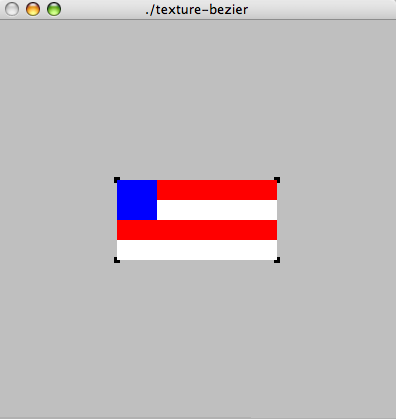
Here are screen-captures of texture-mapping onto quads:
| texture-mapped quad on Linux | texture-mapped quad on Mac |
|
|
The same exact code is being compiled on both platforms. It consists of two parts, a utility file called "tw-fake.h" and the main program. Here's the main program (just 50 lines of code):
Here's the utility file (134 lines long, but most of it is trivial):
Oh, and FYI, here's the Makefile I use to compile them:
The point of this example is just to rule out a bunch of obvious possibilities. That is, we can, I think, assume that
Of course, there may be subtle things wrong with any of these, but it will have to be pretty subtle. See the discussion below
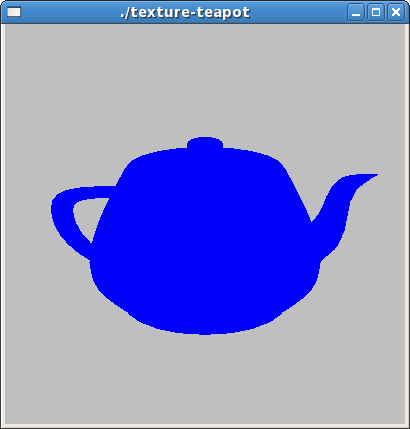
Here, at last, is one aspect of the problem, namely texture-mapping onto the teapot, which I've always been able to do before, and still can on the Mac.
Here are screen-captures of texture-mapping onto quads:
| texture-mapped teapot on Linux | texture-mapped teapot on Mac |
 |
 |
You can see the Bezier patches on the texture-mapped teapot on the Mac. The teapot on Linux is blue, which is evidence that some small amount of texturing is being done, since the color specified for the teapot is green, and that green is being overridden by the blue in the texture's upper left corner.
The code for these two is, again, identical, and just 45 lines of code:
This code also uses the utility file shown above.
The fact that we get the blue color, presumably from the upper left of the texture, is intriguing. You would get this effect, I think, if every teapot vertex's texture coords were (0,0), instead of being equal to the Bezier patch parameters, as on the Mac.
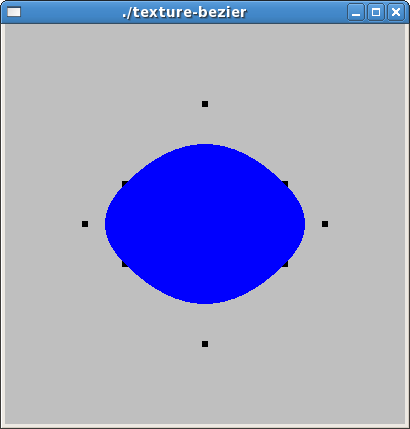
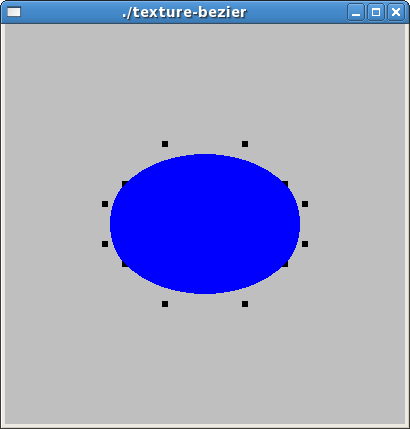
The teapot is, of course, just a collection of Bezier patches. I include it to remove the possibility that I messed up with the Bezier control points. However, I can demonstrate that the problem still occurs with simple Bezier patches. Here is a collection of screenshots of order 2, 3 and 4 Bezier patches with texture-mapping, on both Mac and Linux. The black dots in these pictures show the locations of the control points.
| texture-mapped Bezier patch on Linux | texture-mapped Bezier patch on Mac |
 |
 |
 |
 |
 |
 |
Again, you'll notice that the patches under Linux are blue, not green as you might expect from the code if texture-mapping weren't working at all. Here's the code. This is 140 lines of code, but the interesting part is pretty short:
I've already pointed out that the texture-mapping seems to be working partly under Linux, because the objects are blue, which is the color of the upper left (texture coords (0,0)) corner of the texture. Indeed, if I change that corner to another color, I see that color in these objects.
Something else to consider is that my technique used to work on Linux. (I use these examples in my annual graphics course, and I'm pretty sure they worked correctly on Linux last fall.) This suggests that the difference is some change in the OpenGL libraries in the last year.
In fact, since the code works so well on the Mac, it seems like maybe the difference in the libraries might be a simple as some "enable" parameter that is "on" by default on the Mac but "off" on Linux (and used to be "on"). However, I have no idea what that parameter might be.
Is there some way to find out what version of OpenGL is running on a particular platform? On my Linux machine (Fedora 7), I have the following RPMs:
mesa-libGL-devel-6.5.2-13.fc7
mesa-libGLU-devel-6.5.2-13.fc7
freeglut-devel-2.4.0-11.fc7
I determined that these are the relevant packages by the following. Please correct me if I'm wrong.
make texture-bezier
g++ -g -I/usr/X11R6/include/     texture-bezier.cc  -L/usr/X11R6/lib -lglut  -lGL -lGLU -lXmu -lXi -lX11 -lm  -o texture-bezier
% locate libGL.so
/usr/lib/libGL.so
/usr/lib/libGL.so.1
/usr/lib/libGL.so.1.2
/usr/local/matlab/sys/opengl/lib/glnx86/libGL.so
/usr/local/matlab/sys/opengl/lib/glnx86/libGL.so.1.5.060001
% rpm -qf /usr/lib/libGL.so
mesa-libGL-devel-6.5.2-13.fc7
% locate libGLU.so
/usr/lib/libGLU.so
/usr/lib/libGLU.so.1
/usr/lib/libGLU.so.1.3.060502
/usr/local/matlab/sys/opengl/lib/glnx86/libGLU.so
/usr/local/matlab/sys/opengl/lib/glnx86/libGLU.so.1.3.060001
% rpm -qf /usr/lib/libGLU.so
mesa-libGLU-devel-6.5.2-13.fc7
% locate libglut.so
/usr/lib/libglut.so
/usr/lib/libglut.so.3
/usr/lib/libglut.so.3.8.0
% rpm -qf /usr/lib/libglut.so
freeglut-devel-2.4.0-11.fc7
I'm not quite sure how to do the equivalent on the Mac. My Mac is running 10.4.11 and has all its patches.
Thanks very much for reading all this. Please email me if you have any ideas or suggestions; I'd be very grateful.
If you want to download any of this code and play around with it, please feel free to. There is no "index.html" file in this directory, so you can easily get an index and browse for the files you want.


