
🔬 Lab
CS 240 Lab 6
Pointers in C
CS 240 Lab 6
In this lab, you will get practice working with C programs that use pointers, including predicting results of functions that use pointers, writing pointer code, and analyzing incorrect code.
You will also be introduced to some new tools which will be quite
helpful in understanding and solving problems with your programs. The
GNU debugger gdb allows you to see what is going on
“inside” a program while it executes—or what it was doing at the moment
it crashed. The debugger allows you to display values of variables and
examine contents of memory, which will be handy in understanding the
effect of your programs on the hardware of the system.
Another tool you will use is valgrind, an
instrumentation framework for building dynamic analysis tools
(pronounced like “grinned” not “grind” as it’s named after a gate in
Norse mythology). The Valgrind module we will be using, called Memcheck,
is for memory error detection.
Setup
On a lab computer booted to Linux, open VSCode.
To get all the files for this week’s lab, in the Terminal from the Linux command line enter:
wget http://cs.wellesley.edu/~cs240/s26/lab/starter/cmemory.zip
unzip cmemory.zip
cd cmemory
The cmemory folder contains lots of different practice
files, some of which we’ll use in today’s lab.
Writing Code using Pointers
This section of the lab will give you some practice writing functions with pointers for string manipulation, which are very similar to some you will need for the next assignment.
Exercise 1:
Create a new file named arrayOps.c. Add
the following code to the top:
// arrayOps.c
// Basic array operations to practice programming with pointers.
// <your names go here>

#include <stdio.h>  // gives us 'printf' for output
#include <assert.h>  // gives us 'assert' for testing
#include <stdlib.h>  // gives us 'malloc' and 'free'
Now we will work on a function called arraySum. This
function should compute the sum of an array of integers. It will need
two arguments: an array (i.e., a pointer-to-an-integer), plus a number
that specifies the length of the array (unlike with strings, there’s no
value we can naturally use to mark the end of an array that couldn’t
appear as a normal value in the array).
To write this function, we’ll try out a method called test-driven development. This method involves starting the programming process by writing tests to ensure we understand what our function should do, and then writing documentation describing what it will do, and finally the last step is to write the code.
This method should improve your code quality, and it could save you time, although it does take some discipline not to jump right into writing code.
To start with testing, add the following code to your program:
// Test arrays
int test1[] = {1, 2, 3};

// Test our functions.
int main(void) {
    assert(arraySum(test1, 3) == 6);
    printf("All tests succeeded.\n");
}
You haven’t written arraySum yet, but we do know what it
should do. Add at least 3 more tests using assert
to the main function, along with new test arrays.
What’s an edge case that you should probably test?
Example
answer: The sum of an array with a single
number in it might be weird. Even weirder would be the sum of an array
with 0 numbers. Providing a different number for the length than the
actual length of the array is also interesting; it should work fine if
the length is not larger than the true length, but behavior will be
unpredictable if it’s larger. Also, what if the array pointer provided
is NULL instead of an actual array? You could return -1 in
that case, or you could specify that your function is not designed to
handle NULL and so people who use it shouldn’t give
NULL as an argument.
Can you identify some ways that writing tests first can help speed up your programming process?
Example answer: One big factor is that thinking about edge cases up-front allows you to avoid complicated and error-prone rewrites when you realize there’s an edge case after writing 75% of the code. Another is that once you’ve written your code, if you forgot to handle something, you’ll immediately have failed test that gives you a concrete example of what doesn’t work, and it’s an example that you’re already familiar with since you just wrote it, plus you know what the expected correct behavior is. This speeds up the debugging process a lot, even compared to debugging with tests that someone else wrote.
Now that you’ve thought about edge cases and come up with some tests,
add a comment above the main function
describing what your arraySum function will do, including
how it will handle any edge cases you came up with. Add the
declaration for arraySum below your
comment (as with all C functions, a declaration starts with a return
type, then the function name, then arguments in parentheses with a type
for each).
Why might writing a comment explaining the function make sense before you’ve written the function? How could it help speed up development?
Writing a comment in your own words helps you think through your strategy for the function, and as you’re writing the code it serves as a reminder of what it should do with the edge cases you identified when writing tests. Writing is thinking, and writing function documentation after you write your code gives up the opportunity to do some thinking about the design of the function before you’ve started coding.
As a concrete example, if you write “returns 0 if the input is NULL”
or a similar description of an edge case, you can start your function by
using an if statement to handle that case and get it out of
the way. If instead you wrote the code without that case but later got
caught by a test, it would be more effort to understand what the test
was trying, figure out what you need to do in that case, and then add
the check to your code.
Also: if you’re writing multiple functions that call each other, having documentation for each of them can save a lot of time, especially if they have edge cases that interact with each other.
Compare your code to the example below:
/*
 * Computes the sum of an array of integers. Arguments are the array and
 * its length. If the length is 0 or if the array pointer is NULL, this
 * will return 0.
 */
int arraySum(int *array, size_t length) {
}
You may have chosen a different way to handle 0-length or NULL
arrays, which is fine, as long as you explained it. You might have also
chosen int instead of size_t for the size
argument; that’s okay, but will limit the size of array that can be
processed (size_t is a type that’s designed to hold the
size of a data structure in memory, and is an 8-byte unsigned type,
whereas int is a 4-byte signed type).
Now it’s time to actually write the code. Fill in your
arraySum function, then since you already have tests set
up, in a terminal run:
make arrayOps.bin
./arrayOps.bin
This will build and then run your code. If you get any warnings or
error messages from the make step, fix those first and
re-run make before running the file.
If everything is working, you should see the “All tests succeeded.”
message we put at the end of main. If one of your tests
fails, you should see a message about an assertion failure. You might
also see “Command terminated” or “Segmentation fault” indicating an
error with memory (we’ll see later how to use gdb to debug
these errors). You can add printfs to your code to help
debug things if necessary.
Note that if you don’t see “All tests succeeded.” but you
also don’t see any error messages, and you don’t get another terminal
prompt, it’s possible you’ve created an infinite loop. Hit control-C to
force-stop the program, and try adding a printf to your
loop to see if it’s infinite.
Here’s an example implementation you can compare to:
/*
 * Computes the sum of an array of integers. Arguments are the array and
 * its length. If the length is 0 or if the array pointer is NULL, this
 * will return 0.
 */
int arraySum(int *numbers, size_t length) {
    int result = 0;
    // Handle NULL array
    if (numbers == NULL) {
        return 0;
    }
    // Iterate through the array adding each number to our result
    for (size_t i = 0; i < length; ++i) {
        result += numbers[i];
    }
    // Return result. Will still be 0 if length was 0
    return result;
}
```|]


### Exercise 2:

To practice **idiomatic pointer style** programming, try to rewrite your
`arraySum` function so that it:

1. Uses an `int *cursor` variable which starts out as a copy of the array
    pointer.
2. Does NOT use `[]`.
3. Uses a `while` loop instead of a `for` loop.
4. Adds to the `cursor` variable within the loop.
5. Stops the loop based on the distance between the cursor and the
    original array pointer.
6. Dereferences the cursor using `*` to get the value it points to.

Re-run the file to ensure that it still passes your tests, and use the
debugging techniques mentioned above if not.

Here's an example of the function written in idiomatic pointer style:

[_.][|
```c
/*
 * Computes the sum of an array of integers. Arguments are the array and
 * its length. If the length is 0 or if the array pointer is NULL, this
 * will return 0.
 */
int arraySum(int *numbers, size_t length) {
    int result = 0;
    // Handle NULL array
    if (numbers == NULL) {
        return 0;
    }
    int *cursor = numbers;
    // Keep going as long as our cursor isn't too far from the start yet
    while ((cursor - numbers) < length) {
        result += *cursor;  // add cursor's target to sum
        cursor += 1;  // advance cursor to next entry
    }
    // Return result. Will still be 0 if length is 0
    return result;
}
What’s in Memory?
In previous classes like CS 111 and CS 230 we’ve drawn abstract
memory diagrams do show how values are related to each
other in memory. In these diagrams we used arrows to represent how
values referred to each other, now you know that those arrows are
actually pointers, and we can reason exactly about how
much memory each object takes up (for example, in C an int
is 4 bytes, a pointer is 8, or a character is 1). This allows us to draw
more precise diagrams. Here’s an example of the CS 111 style and the
same information with more precision:
This is the memory diagram format we’ve used in previous classes:
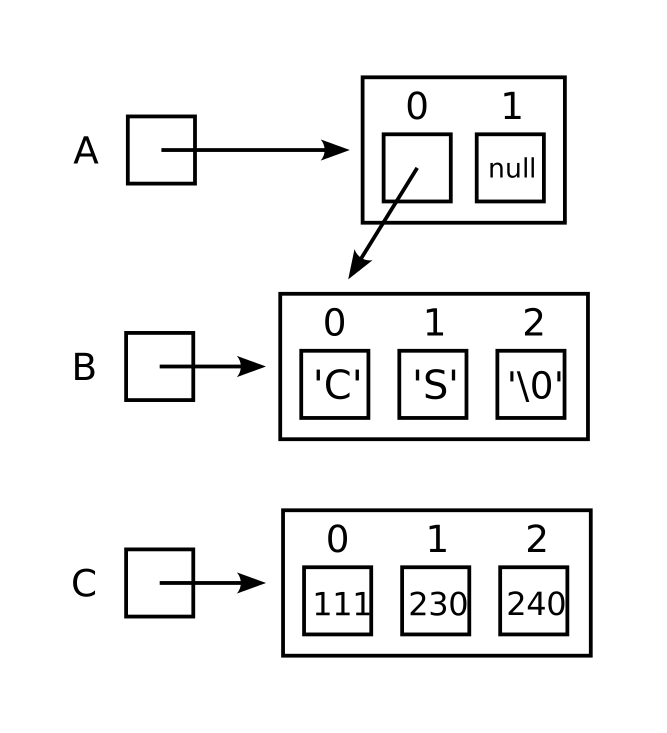
Here is the same data in CS 240 lab style:
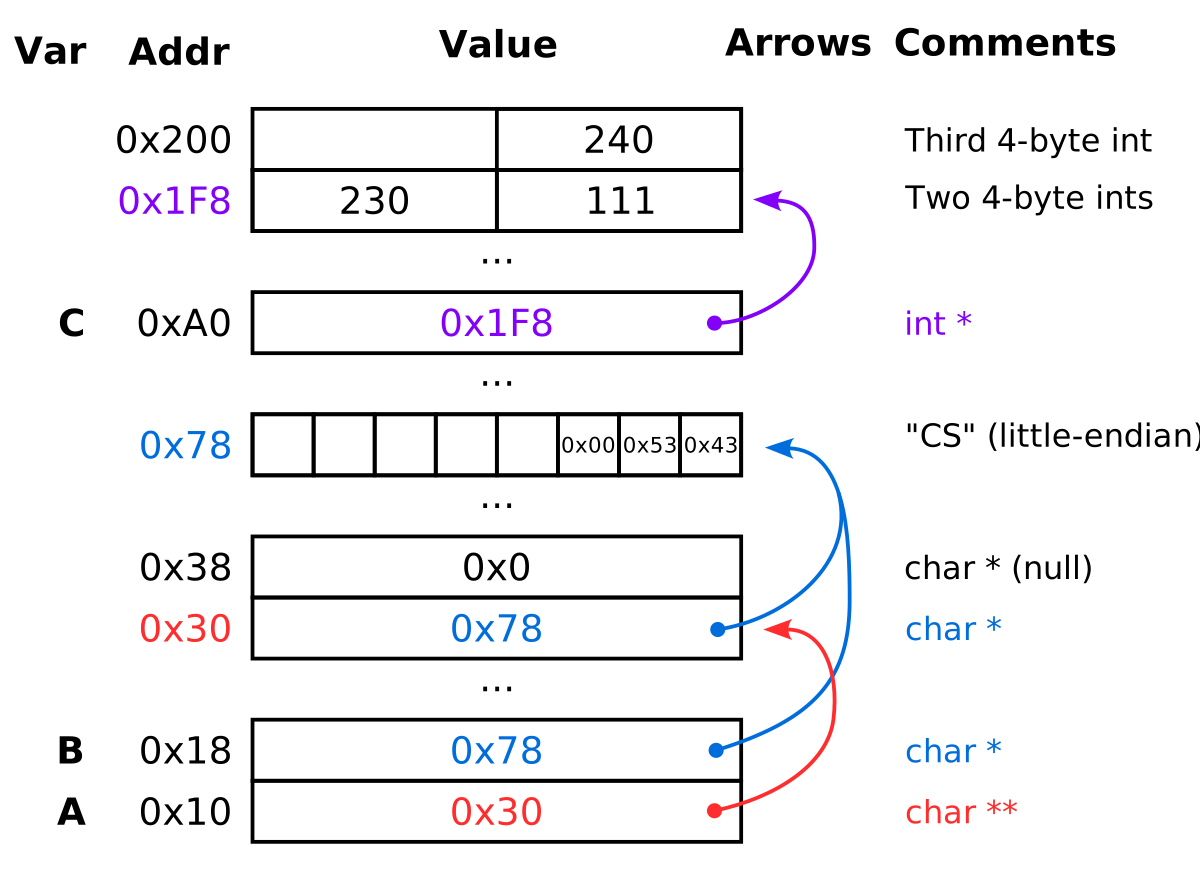
This table represents the same data (with the same layout) as the new-style diagram, but it may be more accessible to people using a keyboard to navigate and/or using a screen reader.
| Variable | Data | Comments |
|---|---|---|
| A | Type char **. Points to start
of next slot. |
|
Type char *. Points to start
of fifth slot |
||
| 0x0 | Type char * (null) |
|
| B | Type char *. Points to start
of fifth slot (directly below this one) |
|
| 0x43, 0x53, 0x0 | Three bytes ‘C’ = 0x43, ‘S’ = 0x53, and NUL = 0x0, at increasing addresses. | |
| C | Type int *. Points to start
of slot below. |
|
| 111, 230 | Two 4-byte ints in this
8-byte slot |
|
| 240 | Third int in the array that
starts above |
Exercise 3:
Note that we have enough information to fill in even more of the diagram: each of the data slots has an address number, and the value of each of the pointer slots is just the address that it points to. In fact, the arrows are just helpful reminders, but the actual values of those slots are memory addresses. Here’s the same table, with addresses added. Fill in the value of each pointer slot below, using hexadecimal notation:
| Variable | Address | Data | Comments |
|---|---|---|---|
| A | 0x00 | Correct answer: 0x08 | Type char **. Points to start
of next block up. |
| 0x08 | Correct answer: 0x20 | Type char *. Points to start
of fifth slot at address 0x20 |
|
| 0x10 | 0x0 | Type char * (null) |
|
| B | 0x18 | Correct answer: 0x20 | Type char *. Points to start
of fifth slot at address 0x20 |
| 0x20 | 0x43, 0x53, 0x0 | Three bytes ‘C’ = 0x43, ‘S’ = 0x53, and NUL = 0x0, at increasing addresses. | |
| C | 0x28 | Correct answer: 0x30 | Type int *. Points to start
of slot below. |
| 0x30 | 111, 230 | Two 4-byte ints in this
8-byte slot |
|
| 0x38 | 240 | Third int in the array that
starts above |
Note that in a real program, 0x00 would not be a valid address (it’s reserved for NULL), and it’s unlikely that the data would be packed so closely in memory. We have introduced some gaps, for example the variable C starts at address 0x28, but it could in theory have started at 0x23, immediately after the end of the “CS” string. That would have made for an awkward diagram (with its 8 bytes stretched across parts of 2 different slots) and in a real computer, pointer values are also usually aligned to multiples of 8 bytes for efficiency reasons.
To help you understand pointers better, consider the following code:
char *message = "Eel cafe does  good.";  // two spaces before 'good'

int main(void) {
    printf(message);
    int words = 0;
    int inWord = 0;
    int *cursor = message;
    while (*cursor) {
        char letter = *cursor;
        // Detect word ends as space when we're in a word.
        if (letter == ' ') {
            if (inWord) {
                words += 1;
            }
            inWord = 0;
        } else {
            inWord = 1;
        }
        // Advance cursor
        cursor += 1;
    }
    if (inWord) {
        words += 1;
    }
    printf("Word count: %d\n", words);
    return 1;
}
In this code, when we say int *cursor = message, what’s
the relationship between the cursor and
message variables?
They are
equal to each other, and will remain equal over the life of the
program.
cursor
is now a pointer that points to
message.
message
is now a pointer that points to
cursor.
The
value of message (a memory address) is copied into the
space for the cursor variable, so they (for now) share the
same value and thus point to the same
place.
Explanation: Equals signs copy values. In previous courses, we talked about “copying arrows.” Now we can see that what is copied is just a number, like copying an integer, except the number happens to also be a memory address and will be treated as such by other code.
When will the loop while (*cursor) { stop?
When
cursor becomes NULL.
When
*cursor becomes NUL.
When
*cursor is a non-truthy character like a
space.
When
cursor reaches a segment
boundary.
Explanation: Characters are 8-bit numbers, and in C,
if and while treat non-zero values as true and
zero as false. So the loop will stop when we reach the NUL byte (value
0) at the end of the string.
Now use a whiteboard to draw a memory diagram of the results of this
code, including address labels and pointer values. You may use
single-quoted characters like ‘a’ or ‘b’ to describe the bytes in
strings rather than looking up their ASCII values, for example,
0x43 in the previous table could be 'C'
instead.
Make the following assumptions as you draw your diagram:
- Assume that the string constants used in the program (“Eel cafe…”
and “Word count…”) are stored starting at address
0x18000and are contiguous with each other. - Assume that the address of the
messagevariable is0x20000. Use ‘…’ to indicate gaps between addresses in your diagram as appropriate. - Assume that all four local variables of
mainare stored consecutively in the order they’re declared, starting at address0x80000.- Remember that ints are 4 bytes, poiners are 8, and chars are 1.
- Diagram the state of memory after
mainhas completed right before it returns.
Compare your diagram against this solution (your diagram doesn’t need to include comments):
[._][|
| Variable | Address | Value | Comments |
|---|---|---|---|
| 0x18000 | ‘E’, ‘e’, ‘l’, ’ ‘, ’c’, ‘a’, ‘f’, ‘e’ | String constant stored in data segment | |
| 0x18008 | ’ ‘, ’d’, ‘o’, ‘e’, ‘s’, ’ ‘,’ ‘, ’g’ | ||
| 0x18010 | ‘o’, ‘o’, ‘d’, ‘.’, 0x0, ‘W’, ‘o’, ‘r’ | Second string starts | |
| 0x18018 | ‘d’, ’ ‘, ’c’, ‘o’, ‘u’, ‘n’, ‘t’, ‘:’ | ||
| 0x18020 | , ’ ’, 0x0 | NUL at end of string could also be written ‘\0’ | |
| … | |||
| message | 0x20000 | 0x18000 | Global variable |
| … | |||
| words, inWord | 0x80000 | 4, 1 | Counted 4 words; ended in a word; each
int is 4 bytes |
| cursor | 0x80008 | 0x18014 | Pointing at NUL at end of first string. |
| letter | 0x80010 | ‘.’ | Still holds last non-NUL letter from final loop iteration. |
|]
gdb (GNU Debugger)
Next, let’s look at the program main4 from the
cmemory folder in gdb, the GNU debugger, which
will allow us to execute our program and examine variables and memory
along the way to find problems.
For extra details, you may want to consult the official
gdb manual, or some of the links on our tools page, in particular this CS240 reference sheet and this general
quick-reference card.
Exercise 4:
First, build the main4.bin program (“bin” stands for
“binary” and refers to the fact that it’s in machine code form, ready to
run on the CPU) using make on the command line:
make main4.binIf this command doesn’t work, double check that
you’ve done the setup steps from the beginning of the lab. You need to
be in the cmemory directory that was created when you ran
cs240 start cmemory (or unzipped
cmemory.zip).
Next, start the program from the command prompt using
gdb:
gdb main4.binYou should now get a prompt that says (gdb). First,
we’ll view the code of the program from within gdb:
(gdb) list      // note that line 7 contains the assignment of ‘B’ to ptr[20]
1   #include <stdio.h>
2   #include <stdlib.h>
3
4   int main(void) {
5       char ch = 'A';
6       char* ptr = &ch;
7       ptr[20] = 'B';
8       printf("%c\n", ptr[20]);
9   }
10
Set a breakpoint:
(gdb) break 7Run the program (it will hit the breakpoint)
(gdb) run
Breakpoint 1, main () at main4.c:7
7       ptr[20] = 'B';
The program is paused at this point, and is ready to execute line 7 next.
You can display the contents of variables or memory locations using
the print command (the /x means display the
value in hexadecimal notation). Print the pointer (address in memory) as
a hexadecimal number:
(gdb) print /x ptrPaste what is displayed, and explain it:
$1 = 0x7fffffffd597
This shows the value of the pointer ptr (in hex), which
is the memory address of the character stored in variable
ch.
Extra detail: because the address starts with 0x7ff,
it’s on the stack.
Prints value being pointed to as a hexadecimal number:
(gdb) print /x *ptrPaste what is displayed, and explain it:
$2 = 0x41
This shows one character (the letter ‘A’) as hex. It’s the value in memory pointed to by the pointer.
Print a value as a character (/c):
(gdb) print /c *ptrPaste what is displayed, and explain it:
$3 = 65 ‘A’
Shows both the decimal value for this byte and the ASCII symbol.
Print a value located at offset from a base address, using ptr notation to refer to the value:
(gdb) print /x *(ptr+20)Paste what is displayed, and explain it:
$1 = 0xf7
This is an uninitialized value, so it could be anything. Here we see the number 0xf7.
You can also print a value using array notation to refer to value offset from a base address:
(gdb) print /x ptr[20]Next, display multiple memory values using x (stands for eXamine). You can specify multiple values to be displayed, started at the specified address:
(gdb) x /24bx ptr //will display 24 bytes of data, starting at ptr in memoryYou should see something like this:
0x7fffffffd597: 0x41    0xe7    0xd7    0xff    0xff    0xff    0x7f    0x00
0x7fffffffd59f: 0x00    0x00    0x00    0x00    0x00    0x00    0x00    0x00
0x7fffffffd5a7: 0x00    0x55    0xf5    0xa2    0xf7    0xff    0x7f    0x00
What are the numbers on the left-hand side, before the colons?
Example
answer: These are the addresses of the data
that’s displayed. We asked to display memory starting at
0x7fffffffd597 (the value of ptr we saw
earlier), so that’s the first address shown. Depending on how wide your
terminal is and therefore how many bytes can be displayed, the
subsequent addresses may vary, since they’re the addresses of the first
byte in each row.
What are the 2-digit hex values to the right of the colons?
These are the values stored in the target memory, starting with the
byte that ptr points to and then continuing with the 23
subsequent bytes, since we asked for 24 total. Hex digits are 4 bits
each, so 2 hex digits is 1 byte.
Note that the initial 0x41 is the ‘A’ we saw earlier.
The byte at ptr[20] is actually part of a larger value being stored on the stack for later use: 0x7ffff7a2f55 Do you see how you can read that value from the display? (Start at byte 22 and read backwards). Why do you have to read backwards?
Example
answer: The debugger displays bytes left to
right, with the byte with the lowest address leftmost (the opposite of
little-endian, where the lowest byte holds the least-significant value,
but that least-significant value is written to the right.). So, to write
a multi-byte value with the most significant byte at the highest address
(little-endian order, as we prefer), you need to reverse the order of
the bytes as shown in gdb. With the ‘x’ command you can use
a letter like ‘q’ or ‘g’ instead of ‘b’ to have it group multiple bytes
together and display their values in the usual reading order.
Now, execute a single instruction using step:
(gdb) stepAt this point, the ptr[20] = ‘B’; instruction would be executed, and you would expect the memory location 20 away from ptr to have a new value. Examine it as you did before:
(gdb) x /24bx ptrPaste the output and explain which byte got which new value:
0x7fffffffd597: 0x41    0x77    0xe0    0xff    0xff    0xff    0x7f    0x00
0x7fffffffd59f: 0x00    0x00    0x00    0x00    0x00    0x00    0x00    0x00
0x7fffffffd5a7: 0x00    0x55    0xf5    0xa2    0x42    0xff    0x7f    0x00
The byte 4th from the right in the bottom row has the value
0x42 now, which is the ASCII value for uppercase ‘B’.
Continue after the breakpoint:
(gdb) continue // will continue running after the breakpoint to complete the programWhat happens next?
First, B is printed. Then the program generates a segmentation fault. The message reads (note you may have a different specific address):
Program received signal SIGSEGV, Segmentation fault.
0x00007fff42c295d0 in ?? ()
Notice that gdb tells you where the segmentation fault
occurred. What is significant about that address?
It
contains the 0x42 byte that we wrote into
memory.
It matches
the 8-byte address stored directly after the ‘A’ in
memory.
It doesn’t
start with 7fff… so it’s not a stack
address.
If you get a segmentation fault when running your program from the
command prompt, you can try running it in gdb, as well,
because you can get more information in the debugger about what is
causing the problem. In a normal situation, for example, you could use
the ‘backtrace’ command to see which functions have been called and what
lines of code those calls are on (in the current situation we’ve
corrupted the stack so that won’t work).
Now we’re ready to move on, so exit gdb by typing
quit:
(gdb) quitvalgrind
(valgrind is pronounced like “val
grinned,” after the gate to Valhalla from Norse mythology.)
To understand how pointers work, it is helpful to consider some more
examples where code for allocating memory does not produce the desired
result. In this exercise, you will run your code using
valgrind, which should help you understand why your code is
incorrect. The following files are in the cmemory
repository:
fibloop2.c Makefile search.c
strings3.c fibloop.c matvec.c
strings2.c strings.c
Exercise 5:
Compile the buggy programs by running:
make bugsOpen the file fibloop.c and examine the code. Explain
how it works:
This
malloc slide has a quick overview of what the
malloc function does.
Example answer: It loops through indices putting the fibonacci number in each index by adding together the two numbers in the two previous slots.
Run the program:
./fibloop.binDoes the program seem to work correctly? Yes
No
Now, run the program using valgrind:
valgrind ./fibloop.binExamine the output carefully (it should mostly match what’s shown here):
==23213== Memcheck, a memory error detector
==23213== Copyright (C) 2002-2012, and GNU GPL'd, by Julian Seward et al.
==23213== Using Valgrind-3.8.1 and LibVEX; rerun with -h for copyright info
==23213== Command: fibloop
==23213==
==23213== Invalid write of size 4
==23213==    at 0x400625: fibs (fibloop.c:23)
==23213==    by 0x400651: main (fibloop.c:29)
==23213==  Address 0x4c2e054 is 0 bytes after a block of size 20 alloc'd
==23213==    at 0x4A06A2E: malloc (vg_replace_malloc.c:270)
==23213==    by 0x4005BF: fibs (fibloop.c:17)
==23213==    by 0x400651: main (fibloop.c:29)
==23213==
==23213== Invalid write of size 4
==23213==    at 0x400625: fibs (fibloop.c:23)
==23213==    by 0x40065F: main (fibloop.c:30)
==23213==  Address 0x4c2e0bc is 0 bytes after a block of size 28 alloc'd
==23213==    at 0x4A06A2E: malloc (vg_replace_malloc.c:270)
==23213==    by 0x4005BF: fibs (fibloop.c:17)
==23213==    by 0x40065F: main (fibloop.c:30)
==23213==
result = 0 1 1 2 3
==23213== Invalid read of size 4
==23213==    at 0x4006DE: main (fibloop.c:41)
==23213==  Address 0x4c2e0bc is 0 bytes after a block of size 28 alloc'd
==23213==    at 0x4A06A2E: malloc (vg_replace_malloc.c:270)
==23213==    by 0x4005BF: fibs (fibloop.c:17)
==23213==    by 0x40065F: main (fibloop.c:30)
==23213==
result = 0 1 1 2 3 5 8 13
==23213==
==23213== HEAP SUMMARY:
==23213==     in use at exit: 0 bytes in 0 blocks
==23213==   total heap usage: 2 allocs, 2 frees, 48 bytes allocated
==23213==
==23213== All heap blocks were freed -- no leaks are possible
==23213==
==23213== For counts of detected and suppressed errors, rerun with: -v
==23213== ERROR SUMMARY: 3 errors from 3 contexts (suppressed: 6 from 6)
Based on this output, describe the problem with the program.
Example
answer: The loop in fibs has the wrong
continuation condition (i <= n instead of
i < n), causing it to run one extra time and write to
memory beyond the end of the allocated block. One of the two prints in
main also prints out this extra value.
Fix the problem by modifying the code, and save the code file. Before
re-running it with valgrind, what command do you need to
issue in the shell?
Example
answer: You need to run make
(or make bugs or make fibloop.bin) to re-build
the machine code from the C code. Otherwise, valgrind will
be running the old machine code that still has the bugs in it.
Now, re-run it, verifying that valgrind no longer
produces errors.
Which lines of code needed to be changed to get rid of the
valgrind errors?
Line 19 had the bug that caused an invalid write. Changing
<= to < on this line fixes it. Line 40
had a similar bug, with the same solution.
Alternatively, changing 7 to 8 on line 30 would generate an extra number so that the loop on line 40 would be valid.
Programming with
malloc
Exercise 6:
To get some practice using malloc and free,
we’ll return to the arrayOps.c file you created earlier
(and use test-driven development again). Write a function called
everyOther which, given an array of integers and its length
as arguments, allocates a new array using malloc that’s
half as long and copies every other element of the original array into
the new array. It should return the pointer to the new array, which
whoever calls it (including your testing code) will be responsible for
freeing.
Remember that to use malloc you’ll need to specify the
number of bytes you need (sizeof helps here) and cast the
result to the type you want. For example, to allocate an array of 3
integers, you’d do:
int *a = (int*) malloc(sizeof(int) * 3);As before, start with your tests. What big design decisions were not mentioned in the description above?
Example answer: Two big ones are: how long should the result be if the input array has an odd length, and does “every other element” mean the even- or odd-index elements? Feel free to decide for yourself what answers these questions should have. Writing tests first helps force you to think about and commit to decisions like these up-front, rather than having them be made implicitly as you write your code.
Write at least 3-4 tests for everyOther and then compare
to the example below to make sure you’ve formatted them correctly. Try
to cover key edge cases.
// Test arrays
int test1[] = {1, 2, 3};
int test2[] = {111, 230, 231, 235, 240};

int main(void) {
    // Tests of arraySum
    ...

    // Tests of everyOther
    int *result = everyOther(test1, 3);
    assert(result[0] == 1);
    assert(result[1] == 3);
    free(result);
    result = everyOther(test2, 5);
    assert(result[0] == 111);
    assert(result[1] == 231);
    assert(result[2] == 240);
    free(result);
    result = everyOther(test2 + 1, 4);
    assert(result[0] == 230);
    assert(result[1] == 235);
    free(result);
    result = everyOther(test2, 0);
    assert(result == NULL);  // no need to free it
    result = everyOther(NULL, 3);
    assert(result == NULL);  // no need to free it

    // Done with tests
    printf("All tests succeeded.\n");
    return 0;
}
Notes:
- We’ve chosen here to start from index 0 and to round up for odd-length inputs.
- We make sure to free each result when we no longer need it.
- The length of the result array is implicit. There’s no way to check that it’s correct.
- Our third test uses a pointer to the second element of the second test array and reduces the reported length by 1 to compensate, allowing us to test an effectively-even-length array without declaring a 3rd test array.
- We chose to return NULL when the length is 0.
- We didn’t cover one possible edge-case: when the incoming length is 1.
Now that you’ve thought about the design and have an idea of how to
handle odd and edge cases, write up your description as a comment and
add your function signature, again making sure this is above
where main is defined. Here’s an example:
/*
 * Allocates and returns a new array that's half (rounded up) the length
 * of the given array (whose length is also specified). The new array
 * contains every other element of the original array (the elements at
 * even indices starting with the first element at index 0).
 *
 * If the input array is NULL, or the array length is 0, this will return
 * NULL without allocating anything. If there isn't enough memory to
 * allocate the result, we'll print an error message and return NULL.
 *
 * Whoever calls this function is responsible for freeing the array it
 * allocates.
 */
int *everyOther(int *array, size_t length) {
}
Note that you do not have to make all the same choices that we did in this example.
Now you’re ready to write the code. As before, pay attention to any
compiler warnings/errors, and debug using printf to help
tell you what’s going on if you need to.
Here’s an example solution for everyOther, but note that
if you made different design choices, your code might work
differently:
/*
 * Allocates and returns a new array that's half (rounded up) the length
 * of the given array (whose length is also specified). The new array
 * contains every other element of the original array (the elements at
 * even indices starting with the first element at index 0).
 *
 * If the input array is NULL, or the array length is 0, this will return
 * NULL without allocating anything. If there isn't enough memory to
 * allocate the result, we'll print an error message and return NULL.
 *
 * Whoever calls this function is responsible for freeing the array it
 * allocates.
 */
int *everyOther(int *array, size_t length) {
    // Catch edge cases
    if (length == 0 || array == NULL) {
        return NULL;
    }
    size_t resultLength = length / 2;  // integer division
    if (length % 2 == 1) {
        resultLength += 1;  // round up
    }
    // Result length should not be zero here
    assert(resultLength > 0);
    int *result = (int*) malloc(sizeof(int) * resultLength);
    if (result == NULL) {
        printf(
            "Error: Out of memory in everyOther with %lu elements.\n",
            length
        );
        return NULL;
    }
    int *cursorFrom = array;
    int *cursorTo = result;
    while ((cursorFrom - array) < length) {
        *cursorTo = *cursorFrom;
        cursorFrom += 2;  // skip ahead by 2
        cursorTo += 1;  // advance 1
    }
    // Now cursorTo should be 1 past the end of the result
    assert(cursorTo - result == resultLength);
    return result;
}
Note that we include a few assertions at key points in the code to double-check things that should be true but could have been false because of a bug.
Let’s reflect on the test-driven development process. How did you feel about it overall, and does it seem like it saved you time and/or improved the quality of your code?
There’s no “correct” answer here. Academic studies have a range of results depending on the kind of software being made and the metrics used. There is evidence that in the long run when you account for maintenance and debugging, test-driven development saves time, and there’s stronger evidence that it tends to improve code quality. But it’s possible to spend too much time writing tests, especially in situations like interactive applications where tests can be very difficult to write.
For a well-defined problem with a small scope and easily testable behavior like the ones you’ll mostly encounter in course work, test-driven development should be a good fit.
Stretch Exercise: More
valgrind Pratice
Exercise 7:
Use valgrind to fix the code in
fibloop2.c.
Describe the problem(s) you fixed:
Same <= n issue with the loop, and the return value (now just a
number) is also wrong because it returns the item after the end of the
array. Modifying the malloc call to allocate one extra spot
is the simplest/best way to fix this because it keeps the semantics
(return the nth fibonacci number).
ALSO, the allocated memory is never freed, so more and more memory
gets wasted every time you call fib (valgrind
reports a “leak summary” about this).
Fixing this leak is tricky because you can’t free before you return unless you first copy your return value into a new local variable. You can’t free after you return, because your function does not return the array it allocates.
Stretch Exercise: Predicting the Behavior of Mystery Functions
To get more practice with pointers, we’ll predict the behavior of some functions and verify by running the programs and observing the output.
Exercise 8:
Examine the files main0.c through main3.c
from the repository and predict the output of each (you already saw
main4.c in the gdb section). Feel free to give
a vague answer if you’re not sure, but do actually read the code:
main0:
Example answer: Prints the letter ‘A’
main1:
Example answer: Prints the letter ‘A’
main2:
Example answer: Prints the address of the variable ‘ch’, which will be somewhere on the stack.
main3:
Example answer: Prints a character on or after the stack 20 characters beyond ‘ch’. We don’t know what this character will be and it may change every time we run the program.
Compile all the files by running:
make predictionsNote: You can also compile any of the individual
filename.c files by running make filename.bin.
In general, if the makefile is set up properly, typing
make <name> will create the file named
<name>.
Run main0 through main4 to test your predictions by entering the commands as shown below at the command prompt. The expected output is also displayed.
Note: the $ shown here takes the
place of the shell prompt and is included to indicate which lines you
should run vs. which are output.
$ ./main0.bin
A
$ ./main1.bin
A
$ ./main2.bin
0x7ffe8bacf967
$ ./main3.bin
?
Note that the value you see for main2.bin may be
different, and the character printed by main3.bin is
effectively random.
The value printed by main2.bin is the address in memory
that ptr refers to on the machine you are using to run the
program. A large address in this range (starting with 7ff) in our
machine is understood to be part of the stack, which is
the area of memory used for storing local variables for a function
(along with other important information about which we will soon be
learning more).
The value printed by main3.bin is whatever is 20 spots
beyond the local variable ch. We don’t know what will be
there, and a security measure called address
space layout randomization changes what will be there each time the
program runs (this is also why the value for main2.bin
varies). You can try running main2.bin and/or
main3.bin several times to see if you get different
results.
Now write code for contains_char_a. Note that there are
multiple valid approaches here; the solution below is just one of
them.
/**
 * Return 1 if the string given by haystack contains the character
 * given by needle.
 * Return 0 otherwise.
 *
 * Precondition: haystack is a valid pointer to a well-formed string.
 *
 * Use array indexing.
 * Do not use any other functions.
 */
int contains_char_a(char* haystack, char needle) {
    int index = 0;
    char this = 1;
    while (this != 0) {
        this = haystack[index];
        index += 1;
        if (this == needle) {
                return 1;
        }
    }
    return 0;
}
Once more, compile your code and check that the tests passed.
Next, write code for contains_char_p:
/**
 * Return 1 if the string given by haystack contains the character
 * given by needle.
 * Return 0 otherwise.
 *
 * Precondition: haystack is a valid pointer to a well-formed string.
 *
 * Do not use array indexing.  [] is banned.  Use pointer arithmetic instead.
 * Do not use any other functions.
 */
int contains_char_p(char* haystack, char needle) {
    while (*haystack) {
        if (*haystack == needle) {
                return 1;
        }
        haystack += 1;
    }
    return 0;
}
Run the file to make sure your code passes the tests.