CS 240 Lab 7: x86 Assembly
Peter Mawhorter
Outline
- x86 Architecture
- How Does a Computer Work?
- x86 Details
- Disassembly
x86 Architecture
- x86 microarchitecture is extremely complicated
- Instructions get broken into micro-ops
- Multiple instructions run at once when possible
- RAM access is slow and so requires scheduling and caches
- We won’t cover x86 circuitry in this class
Diagram from techschems.com
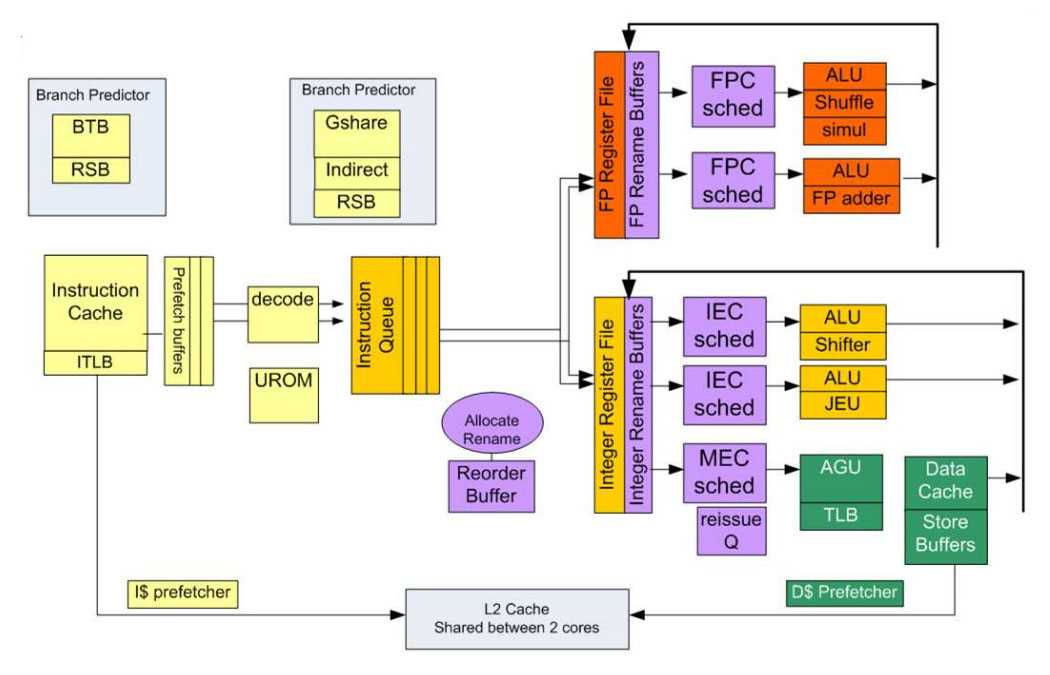
x86 Architecture
- Instruction Set Architecture:
- You’ll need to learn some of this in this class
- A grad-level computer architecture class will cover more details we don’t have time for here.
x86 Architecture
There’s too much information here for us to understand all at once. But as in other parts of the class, we are honing our dealing-with-information-overload skills:
- Pick out what’s important for your purposes
- Cut a piece away using abstractions
- Double-check foundational understanding
How Does a Computer Work?
- ✓ It runs programs composed of machine instructions using a CPU
- ? How are the programs I write translated into machine instructions?
- How are functions, conditionals, and loops implemented?
- ? Why should I care what the machine instructions are doing?
x86 Details
Anatomy of an x86 Instruction
INST OPERAND, DEST ↔︎ add %rdi, %rax
- INST is the name, possibly w/ suffix (
movvs.movl). - OPERAND is the first operand
- DEST is the destination (also second operand)
- Result codes (e.g., zero flag) go into the “FLAGS” register (no direct access)
- Lots of operand rules (e.g., “operand must be register”)
Beware Intel vs. AT&T syntax and GAS vs. NASM vs. MASM (we use AT&T/GAS)
x86 Operands
%RRRor%RR- register name (%rax,%ah)$CONST- constant value ($0xF0,$240)- Can be decimal or hexadecimal depending on
0xprefix
- Can be decimal or hexadecimal depending on
NUMBER- constant memory address (0xF0,123)- Lack of
$means memory access
- Lack of
NUMBER(%RRR, %RRR, STRIDE)- variable memory address- See next slide
- NO arithmetic allowed
- We are specifying each basic operation. We can’t ask for another operation in the middle of the one we’re specifying.
Address Calculation
- Syntax offset ( base,
index, stride ), e.g.:
8(%rdi, %rsi, 4)- base and index are registers
- offset must be number
- stride is a number (only 1, 2, 4, or 8)
- The computed address is base + offset + (index × stride)
- Iterating through a string:
- base is the start of the string (original pointer)
- index is the index variable
- offset could be used, e.g., to skip 1st letter
- stride would be 1, but could be 4 for ints instead of chars
Common Instructions
movcopies stuffj*jumps (lots of varieties likeje,jge, etc.)cmp/testcompares (to set up for conditional likeje)pushandpopstores/reads stackleastores address in register (think of&)- “Load Effective Address,” a.k.a. “Lovely Efficient Arithmetic”
- Keep this reference handy and use compiler explorer right-click docs (this link lets you enter assembly code directly)
Credit to Ben Wood for “Lovely Efficient Arithmetic”
Register Names
- %rax Accumulator (return value)
- %rcx Count (arg 4)
- %rdx Data (arg 3)
- %rbx Base
- %rsp Stack Pointer
- %rbp Base Pointer
- %rsi Source Index (arg 2)
- %rdi Destination Index (arg 1)
- %r8 - %r15 (args 5 + 6 in r8 and r9)
- %rip Instruction Pointer (only special access)
Registers for Arguments
- History of register names
- (Historical) special purposes of the registers
- Mnemoic for argument order:
- %rdi: Diane’s
- %rsi: silk
- %rdx: dress
- %rcx: costs
- %r8/9: $89
Apparently this mnemonic is from Geoff Kuenning who I took classes from at HMC
Contrasts w/ HW ISA
- Second operand is also destination
ADD R1, R2, R3vs.add %rdi, %rax- Instead of
x = a + bwe only getx += a
- Constants allowed (only in certain places)
ADD R1, R1, R6vs.mov $2, %rsi
- Index register in memory addresses
LW R2, 3(R5)vs.mov 3(%rax, %rdi, 8), %rdx
- Two-step branching w/ fixed destinations
BEQ R1, R2, 3vs.cmp $rax, $rdi/jeq 0x54321
- ~700 instructions instead of 9 (you only need ~20-30)
- Important: stack/call stuff (
push,pop,callandret)
- Important: stack/call stuff (
Disassembly
- Use
objdump -dordisascommand withingdb - Can also compile using
-Sflag forgccto get a file- Using
-O0(the default) does no optimization; many things will be stored on the stack unnecessarily - Using
-O3does lots of optimization; gets stuff done without the stack where possible
- Using
Compiler Explorer
- Compiler Explorer shows C and assembly side-by-side
- Setup:
- Select “C” language on the left side
- Select “x86-64 gcc 11.5” from the right-side compiler menu
- Add “–std=c99” to the compiler options on the right
- Try “-Og” or “-O1” options for simpler assembly
- Uncheck “Intel asm syntax” in the Output menu on the right
- Right-click and use “View assembly documentation”
Exploring string_length_a
- Compiler Explorer link
- Can run
objdump -d practice.bin - Could also run
gdb practice.binand thendisas string_length_a
Lab Work
- Let’s go on an adventure!
- Partners reminder