
🔬 Lab
CS 240 Lab 12
Malloc
CS 240 Lab 12
This lab will help you get started on the malloc
assignment.
Exercise 1: The Purpose of
malloc
You’ve used malloc in previous assignments, and so you
already know a bit about how it works. In order to better understand the
implementation details, it’s useful to know more about the problems that
malloc is trying to solve.
Before malloc and the stack were invented, programmers
would manage memory themselves using raw addresses, or programming
languages would help a bit by automatically assigning fixed memory
addresses to each variable. Imagine that each variable you declare
(including each parameter to every function) has a fixed memory address
throughout the lifetime of the program, and that these addresses are
spaced apart from each other so that the maximum size of data held in
each variable is limited by where the address of the next variable was
placed. Check the box for each data structure/language feature that CAN
be used with this kind of design:
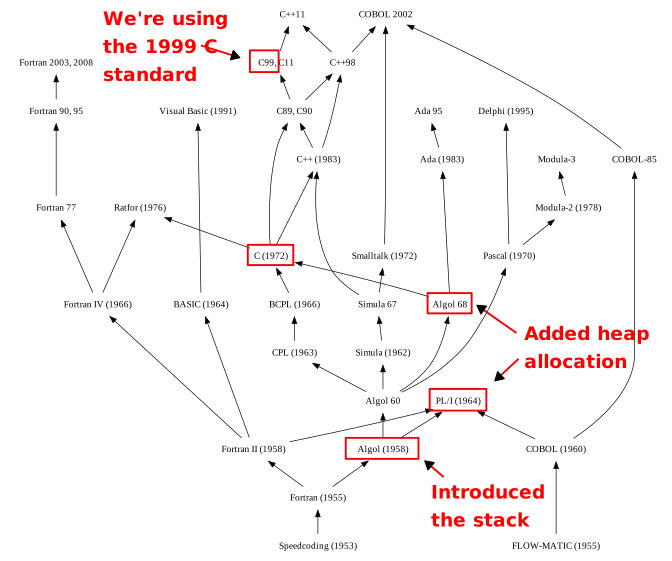
A chart of influences between historical programming languages. Algol (1958) introduced the concept of a stack and local variables; PL/I (1965) and Algol 68 introduced the concept of a heap with dynamic memory allocation. C (1972) was influenced by Algol, and the version we’re using in this class (C 99) is a successor with some influence back and forth from C++.
By Shazz, Borkowsk, Qwertyus, Peter Mawhorter, CC BY-SA 3.0, View on Wikimedia CommonsFunction
calls (using only global variables)
Function
calls (using local variables)
Accumulator
variables in loops
Recursive
functions
Fixed-size
arrays
Linked lists
which add nodes when needed
String
concatenation (combined/total size known)
String
concatenation (combined/total size not known)
Object
constructors (return a newly-allocated
object)
In the 1950’s with the invention of ALGOL, stacks were
introduced to manage function calls (this
great stackexchange post details history around the invention of stacks
and heaps). Now each function call would get stack space allocated
to it, and so local variables of functions would be allocated when the
function was called, and freed when it returned. However, there was no
heap or malloc until the 1960’s (possibly in part because
memory was too scarce in the 1950’s to have the luxury of reserving a
pool that might or might not get used). In this situation, check the box
for each previously-impossible feature that COULD now be used:
Function
calls (using local variables)
Recursive
functions
Linked lists
which add nodes when needed
String
concatenation (combined/total size not known)
Object
constructors (return a newly-allocated
object)
Assuming that an object has a fixed size (and can thus be allocated on a stack), why is it still not possible to create a function that returns a newly-allocated object?
Example answer: Any object allocated on the stack frame for a function will no longer be valid once that function returns, since the stack frame is destroyed (and that memory will be overwritten by whatever function you call next). You can have objects allocated by an outer function whose details are filled in by an initializer function that gets a pointer to an existing object, but of course you then need to know up-front how many objects you need; you can’t just create a new object on-demand.
In the 1960’s with PL/I and ALGOL-68, dynamic
memory allocation beyond the stack was added (for example
ALLOCATE and FREE in PL/I). The programmer
could now request memory allocation whenever they wanted and became
responsible for freeing that memory when no longer needed. This finally
supports dynamic memory requirements like concatenating strings with
dynamic total length, or having one function allocate memory for an
object and return a reference to it, with another later function taking
responsibility for freeing that memory.
The contract from the system’s point of view is fairly simple: one
function (malloc in our case) is used to allocate memory
and specifies only the size needed (in bytes). The system is responsible
for reserving at least as much spaces as was requested, and then
returning a pointer to the start of it so that the caller can access
that memory. The second function (free) lets the system
know that a programmer no longer needs a specific allocated block. The
only parameter is the pointer that was returned from
malloc, indicating the position of the block that’s no
longer needed. The system should drop the reservation for that memory so
that future calls to malloc can now re-use it.
Since the free function call does not require the size
of the region, how does the system know how much memory to free up? Why
wouldn’t it make the system’s job any easier to require the size as a
parameter to free?
Example
answer: The system keeps track of this
information as part of metadata for the allocated memory, either in a
header or footer that’s part of a larger-than-requested memory block, or
in some separate data structure where it can be looked up based on the
block address. The system needs to keep track of this anyways in order
to make sure that allocated blocks do not overlap each other, so there’s
no benefit to requiring the programmer to send that information when
they call free (and it could introduce more bugs if the
programmer makes a mistake with the size they send
in.
Exercise 2: Fragmentation
Memory allocation systems keep track of memory as “blocks” using
various kinds of data structures. Fundamentally, a block can either
represent free memory that nobody is using, or allocated memory that has
been handed out in response to a malloc call and is
currently reserved. Because the sizes of free blocks usually don’t
exactly match the sizes requested by the programmer, when allocating a
block, the allocation system will typically find a free block that’s at
least as big as the request, and then if it’s bigger, split it up,
responding to the request with an address in a new smaller allocated
block that’s just the size that was requested, while turning the
leftover space into a new smaller free block that can be used for
another allocation. Ignoring for a moment how metadata is stored and any
overhead for that, assuming we have a 1000-byte free block and a request
for 250 bytes arrives, we’ll split up our 1000-byte block into a
250-byte allocated block and a 750-byte free block and give a pointer to
the 250-byte block to the requester. To keep things simple, when
free is called, we’ll just mark the appropriate block as
free.
If we went with this very simple memory allocation strategy, we’d run
into a problem in certain situations. Which of the following patterns of
malloc and free requests would have an issue,
assuming that we have 1000 total bytes which start out as a single
1000-byte free block?
Two
malloc calls for 300 bytes each, followed by
frees for each of them, and then two requests for 30 byes
each.
Two
malloc calls for 30 bytes each, followed by
frees for each of them, and then two requests for 300 byes
each.
Three
malloc calls for 300 bytes each, followed by a
free for the last one, and then four malloc
calls for 90 bytes each.
Three
malloc calls for 300 bytes each, followed by a
free for the last one, and then a malloc call
for 301 bytes.
Three
malloc calls for 300 bytes each, followed by three calls
for 30 bytes each.
The issue here is that as we split up free blocks to satisfy
requests, even when the memory is returned using free, we
never join blocks back together, meaning that a larger request later
might be unable to be satisfied even when there is a stretch of free
memory big enough for it, since that stretch of memory is split across
multiple free blocks. To deal with this issue, we need some way of
merging free blocks back into larger blocks, either when
malloc is called with a new request, or when
free is called and a previously-allocated block is now free
again.
Which of the following are advantages/disadvantages of merging free blocks immediately when they are freed vs. later when a new request comes in?
Merging
when a request comes in is efficient because the merging work might not
be needed if no larger requests are made.
Merging when
a request comes in might require merging many blocks at once, so it
requires more total effort than merging when blocks are
freed.
Merging
when a block is freed has a more predictable cost, since you only ever
need to merge a block with its neighbors, rather than needing to merge
many small blocks into one large block all at once. This distributes the
workload of merging more evenly.
Memory
requests usually need to be fulfilled before the user can use the
program, while freeing memory sometimes happens while a program or
feature is shutting down and the user can already move on to other
things, so spending extra time freeing may be less disruptive than
spending extra time when allocating from the user’s
perspective.
Allocating
memory is already a costly operation whereas freeing memory is supposed
to be fast and simple, so doing extra work while allocating is
preferable.
Note: The baseline strategy that we’ll ask you to
implement for the malloc assignment involves merging as
soon as a block is freed.
Exercise 3: Metadata
For the malloc system to work properly, it needs to be
able to perform the following operations:
- Mark a block as free.
- Mark a block as allocated.
- Split a free block into two smaller free blocks.
- Merge a free block with the previous block and/or next block if two or more of them are free.
- Search for a free block that’s big enough to hold a request of a specific size.
To support operation 4, given the address of one block, we need to be able to find the address of the previous block and the address of the next block (at least, as long as those blocks are free; if they’re allocated we don’t care about finding their addresses).
The strategy we’ll use is to store the metadata to support these operations within the blocks themselves, taking up a bit of extra space called a “header” at the start of the block (and for free blocks, a footer at the end too).
A linked list might seem like a natural data structure for this, but it comes with a fair amount of overhead. Assuming that the size of a block takes up 8 bytes, and that each pointer is 8 bytes, for a doubly-linked list with both forward and backward pointers, how many total bytes are required to store both pointers plus the block size?
Correct answer: 24
We can do considerably better with a clever design.
To support just operations 1, 2, and 3 listed above, assuming that block sizes are small enough to fit into 8 bytes, which of the following pieces of metadata are required?
1 byte to
store the allocated/free status of the block.
1 bit
to store the allocated/free status of the
block.
8
bytes to store the size of the block.
8 bytes to
store a pointer to the next block.
8 bytes to
store a pointer to the previous block.
Note that a pointer to the next block is not necessary since given the address of one block and its size you can add the block size to the block address and that will be the address of the next block. A pointer to the previous block would be helpful for operation 4 above, but is not required for operations 1, 2, and 3.
To support operation 4 above, need some way to get the size of the previous block (or a pointer to its address) so that we can modify it when merging if it’s free and we need to merge with it. In theory we could store an 8 byte pointer or size for the previous block in each block’s header, but it turns out we can do better than that. After all, we only need this information when the block is free. Assuming that the block above us is free, and that it contains at least 8 bytes (in addition to its own header information), where could we store its size in a place that the next block could find it without needing to store any extra information in the next block or needing to search from the start of the heap to find the previous block?
In the first
8 bytes after the header of the free block. The next block will be able
to read these by first finding the header and then looking for the next
8 bytes.
In
the last 8 bytes of the block. These are adjacent to the header of the
next block, so it can just look 8 bytes above its own header to find
them.
We could
store a global array of block sizes, so that the next block can look up
its index and subtract one to get the size of the previous
block.
If we do store the size of each free block in a footer at the end of the block, then newly-freed blocks which need to merge with their free neighbors can find that information 8 bytes above their own header and thus subtract that size to find the header of the previous block, when it is free. However, assuming that allocated blocks don’t have room for storing any information beyond what’s in their header, what is stored in the same 8 bytes when the previous block is an allocated block?
Those 8 bytes
will be empty because an allocated block will not use all of the
available space.
Those 8 bytes
will still store the size of the block, since we don’t overwrite the
footer when we allocate a block.
We
don’t know, since whoever requested that block may have used those bytes
to store any kind of data. There is no way to tell whether those bytes
hold a block size or not.
We don’t
know, but if it’s an allocated block, we’ll be able to tell, since bytes
written to the block by the requester can’t be a valid block
size.
This means that in order to safely use a block footer to access the header of a previous free block, we must already know that the block is free. The design that we’re asking you to implement solves this problem by storing 1 additional bit in the header of each block: a copy of the allocated/free bit for the previous block, so that each block can look at its own header to know whether the previous block is allocated, in addition to being able to check its own status. To keep this information up-to-date, which of the operations listed previously need to include code to update the subsequent block’s previous-block-status-bit?
1.
Mark a block as free.
2.
Mark a block as allocated.
3. Split a
free block into two smaller free blocks.
4. Merge a
free block with the previous block and/or next block if two or more of
them are free.
5. Search for
a free block that’s big enough to hold a request of a specific
size.
Assuming that we use operations 5, then 3, then 2 for
malloc and operations 1, then 4 for free, only
operations 1 and 2 need to deal with maintaining these extra status
bits. Nether operation 3 nor 4 change the status of any block nor do
they ever introduce a new neighbor with a different status than the
previous neighbor in that direction.
This means that our header only needs to contain:
- 8 bytes: the size of the block.
- 1 bit: is this block allocated or free?
- 1 bit: is the previous block allocated or free?
Since we can only read or write memory 1 byte = 8 bits at a time, you might assume that this means our header needs to be a minimum of 9 bytes. However, 9 is not a power of 2, and if we round up to the nearest power of 2, we have to go all the way to 16. It’s an awkward and inelegant number, and will not play nicely with things like caches or instructions that require memory alignment. So can we somehow eliminate the extra byte and squeeze things into 8? It turns out we can…
Exercise 4: Alignment and Bit Packing
One consideration that we’ve already seen in the design of the stack and in structure packing is memory alignment. In order to use faster aligned memory access instructions and/or avoid having to check alignment before using CPU instructions that require it, we do things like align integers at multiples of 4 bytes or require that the stack pointer be aligned at a multiple of 16 bytes whenever a function is called (see this stackoverflow answer for a nice deep dive on how this helps performance if you’re curious).
Since some of the same considerations apply to memory allocated on
the heap, making sure that pointers returned by malloc
always have addresses which are a multiple of 16 is a good thing to do.
Each block will have a header plus a “payload” (plus possibly padding at
the end) and the pointer we return is to the start of the payload, since
that’s the memory that the requester can actually use. The payload +
padding for a block may be larger than the requested number of bytes,
but it cannot be smaller.
As it turns out, guaranteeing alignment helps us out in a weird way. Assuming that we somehow make this guarantee, which of the following are true:
The
minimum size of a block (including the header) is 16
bytes.
The minimum
size of a payload + padding (block minus header) is 16
bytes.
The minimum
size of a block header is 16 bytes.
The
distance from the start address of one payload to the start address of
the next payload must be a multiple of 16.
The
distance from the header address of one block to the header address of
the next block must also be a multiple of 16, regardless of header
size.
The
total size of each block (including the header) will be a multiple of
16, since that’s the same as the distance between two
headers.
The total
size of each payload + padding (block minus the header) will be a
multiple of 16, since that’s the same as the distance between two
payload starting addresses.
Unless
the header size is a multiple of 16, the size of each payload + padding
will NOT be a multiple of 16, because the payload + padding size is the
block size minus the header size, and block sizes ARE a multiple of
16.
When
we store the size of a block (including header) as a binary number, the
last 4 bits will all be zeroes (equivalently, the last digit will be a 0
in base 16).
When guaranteeing alignment, because of that last property (sizes are multiples of 16 and thus end in 4 zero bits), we can actually let our two status bits hitch a free ride with the 8-byte size value so that the total header can be reduced from 9 bytes to 8. We simply store the size as normal, but then overwrite the last two bits with the current-block and previous-block statuses. Using this scheme, an 8-byte header encodes both the size and two status bits all at once. In order to extract the true size, what operation do we need to do?
Subtract 15
from the value, guaranteeing that the last hex digit is a
0.
Multiply the
value by 16, guaranteeing that the last hex digit is a
0.
Shift the
value 4 bits to the left, guaranteeing that the last hex digit is a
0.
Bitwise
AND the value with a pattern that has all 1’s except for the last 4 bits
which are 0’s, guaranteeing that the last hex digit is a
0.
In order to extract the status bits from the merged value, what operation do we need to use?
Bitwise
NOT
Bitwise
OR
Bitwise
AND
Bitwise
XOR
The provided code includes status_size,
status_pred and status_used functions which
use bitwise AND to extract the different parts of a block header. It
also has a make_status function which takes a size, a
previous-allocated value, and a current-allocated value and uses bitwise
OR to combine them into a single status value. These store the
current-allocated bit in the last bit and the previous-allocated bit in
the second-to-last bit. Because these functions don’t do any bit
shifting, if we write code that says
if (status_pred(status) == 1) { ... } what will happen?
Example
answer: The code in the if will
never run, because the result of status_pred is either 0 or
2, NOT 0 or 1.
Note: Because of this wrinkle, you should always
use the supplied constant PRED_USED_BIT when comparing the
result from status_pred or when supplying a value to
make_status.
Given this strategy for storing block sizes and statuses together, using a 1 bit for ‘allocated’ and a 0 bit for ‘free’, which of the following hexadecimal numbers can possibly appear as 8-byte block headers (assuming for a moment that it’s possible to have multiple free blocks in a row)?
0x0000000000000000
0x0000000000000003
0x0000000000000013
0xffffffffffffffff
0xfffffffffffffff0
0xfffffffffffffff2
0x0000000000000374
If we assume instead that we always merge free blocks as soon as they’re created, so there are never two free blocks adjacent to each other, which of the following singe hex digits can appear last in a valid block header?
0
1
2
3
4
digits larger
than 4
To summarize all of these complicated factors we’ve just explored:
- Each heap block consists of an 8-byte header plus either unused
space (a free block) or a payload plus optional padding (an allocated
block).
- After the payload padding may be required, causing the block to have space for more bytes than were actually requested.
- The last 8 bytes of a free block are a footer which stores the block’s size (also stored in the header).
- The minimum size of a heap block is 16, which is enough for up to 8 bytes of payload (or just enough to fit the footer for a free block).
- The header stores both the size of the block (always a multiple of
16) and two bits indicating:
- Whether or not the previous block is allocated (1 means allocated), and
- whether or not this block is allocated (same)
- When a new request is submitted via a call to
malloc, we search for a free block big enough to store that data, split that block into two smaller free blocks if it’s larger than needed, and mark the properly-sized free block as allocated. - When memory is freed using
free, we check whether the previous and/or next blocks are free, and merge with one or both of them (or if both are allocated, just mark the block we’re freeing as free). - All operations which mark a block as either free or allocated need to potentially update the ‘previous-block-status’ bit of the block after the block whose status they’re changing.
- Any block can find the address of the next block by simply reading its own header to find its size and then adding that number to its address.
- Any block can check whether the block before it is free by consulting its own header. IF the previous block is free, it can find the header of that block by subtracting 8 from its own address to look at the footer that is at the end of every free block. It can then subtract the size stored in that footer from its own address to get the address of the previous block.
Note: There are a few details about the overall heap format that we haven’t mentioned here. You’ll need to read the assignment instructions and review the starter code to understand everything.
Exercise 5: Testing and Trace Files
As you implement your own malloc, you’ll need to be able
to test and debug your code. The provided starter code has a “trace
file” format which can be used to simulate a sequence of calls to
malloc and free so that you don’t actually
have to write C code that calls these functions in specific ways. It’s
useful to develop your own very short trace file so that you can tweak
it to investigate particular situations when your code isn’t working
correctly. The format of a trace file is as follows:
- The first 4 lines of the file each contain a number:
- Line 1 has a suggested heap size. This is actually ignored by our tests.
- Line 2 has the total number of blocks that are allocated across the entire trace.
- Line 3 has the total number of calls to either
mallocorfreeacross the entire trace. If everything gets freed by the end (not required) then this will be double the value on line 2. - Line 4 contains a weight used for scoring; our tests ignore this.
- Each additional line starts with either ‘a’ for ‘allocate’ or ‘f’
for ‘free’.
- Lines starting with ‘a’ have an ID number and then a size in bytes, with spaces separating the three parts of the line.
- Lines staring with ‘f’ just have an ID number. It must match the ID number of one of the previous ‘a’ lines, and indicates which of the existing allocations is being freed.
For example, consider the following C code that uses
malloc and free:
void *A = malloc(12);
void *B = malloc(16);
void *C = malloc(16);
free(A)
free(B)
void *D = malloc(24);
A trace file that simulates the same sequence of allocations and frees would look like this:
1
4
6
1
a 0 12
a 1 16
a 2 16
f 0
f 1
a 3 24
Trace files use the .rep file extension and are stored
in the traces directory. They can be tested by running
mdriver.bin with the -f option followed by the
filename of a specific trace file (run it with -h for a
summary of all available options).
To practice with this format, translate the following C code into a
trace file, and save it as “tiny.rep” in the traces
directory (if you haven’t started the assignment yet, either do so now
or just save the file locally and email it to yourself or consult the
answer here later or something):
void *x = malloc(1024);
void *y = malloc(512);
void *z = malloc(512);
free(y);
Check your answer against this example:
1
3
4
1
a 0 1024
a 1 512
a 2 512
f 1
Note that the specific numbers on the first and fourth lines don’t actually matter, as long as you do have a number on each of those lines.
Now imagine you have implemented some of the code and you’re worried
there’s a bug with your coalescing mechanism for merging free blocks.
Specifically, you’re worried that it has an issue when both the previous
and next blocks are free. Write a trace file called
coalesce.rep in the traces folder (or just
locally) that uses the minimum number of allocations and frees in order
to set up a situation where three free blocks need to merge together.
You can check it against this answer:
1
2
4
1
a 0 100
a 1 100
f 0
f 1
Note that the sizes don’t matter, nor do the specific numbers on lines 1 and 4. You could also allocate a third block and free it (as long as you free it before the middle block) but that’s not totally necessary. Because the heap starts out as one giant free block which each of these allocations splits apart, the second free with have the first block (now free) before it and the leftovers (created via splitting for the second allocation) after it and so will need to merge all 3 blocks.
This is the kind of trace file you’ll need to construct while debugging to test out certain scenarios.
Exercise 6: Debugging Reminders
The following situations will likely come up when you are writing and testing your code for Malloc, so let’s review the tools that we’ve already learned about for dealing with them:
Segmentation fault. No further info about what happened or where. You should:
Example answer: Run the program with
gdband when the segmentation fault happens, usebacktrace(btfor short) to find out which line of code caused it. By usingupto go up to the appropriate stack frame, you can even useprintto see the values of variables at the time of the segmentation fault, without needing to add prints and recompile your code.Assertion error, showing which assertion failed but not exactly why. You should:
Example answer: Run the program with
gdband use backtrace from the assertion failure to figure out which lines of code from which function(s) led to the failure. The root cause of the error could be one of several functions at different levels on the stack, or it could be an unrelated function which put the stack data into a corrupted state.Stack data is corrupted, but you’re not sure where it happened or what caused it. You should:
Example answer: Add
printfstatements to your code to try to figure out when the corruption is first introduced. It might also be helpful to create or use a smaller focused trace file if you were testing with a big one: try to build the smallest trace that triggers the same kind of corruption. Existing calls tocheck_heapshould already help with this. If you aren’t seeing their output, double-check that#define DEBUGis set to 1, not 0. Sometimes adding more calls tocheck_heapcan be helpful, but make sure to only check the heap when it’s in a consistent state.The program takes forever to run. It’s been 30 seconds and it’s still running. You should:
Example answer: Try setting DEBUG to 0. Printing is quite expensive and some of the trace files are very long. Try running on a very short trace file. If it’s still taking a long time even for a short trace, it’s possible you have an infinite loop. Run it under
gdband hit control-C after a few seconds to interrupt it. Usebtto see what it was doing when you interrupted it. Do this a few more times: if it’s always stuck in the same loop, that’s probably your issue. You can set a breakpoint at the start of a loop and usedisplayto getgdbto display the result of an expression every time the breakpoint is hit. Then hitcfor continue over and over again to watch the loop iterate and see how the value you displayed is changing.Something really weird is going on and it’s impossible to chase down with
gdbor prints. Maybe prints aren’t printing or breakpoints that should be hit aren’t being hit. The code is probably haunted. You can:- Take a break and come back to the code the next day or after a short walk or snack.
- Talk to your partner about it (you should already be working as a team, but if not, now’s definitely the time). If you’re still wondering whether to work with a partner on this assignment, we strongly encourage it!
- Swing by drop-in hours and ask about it. If drop-in hours aren’t happening right now, write up a Zulip post describing your situation in detail. Sometimes even before you post it being forced to describe things to a third party can help you reason through them. Alternatively, get out your rubber duck or sock puppet and talk to them about the code.
- Time travel back in time to more than 30 minutes before the deadline so that you have time to do all of these things. While this may or may not be possible once you’re actually 30 minutes away from the deadline, if you get started coding early and try to bite off a little bit at a time, you’ll be able to avoid the timeline where you are stuck debugging while the clock ticks down, and that’s kinda the same thing as time travel :)
Further Work: Complete the Malloc Checkpoint
You should use the rest of the time in today’s lab to complete the checkpoint for the Malloc assignment. You should get detailed feedback from your lab instructor on how you draw the diagrams for part 2 of the checkpoint before you turn it in, because there are a lot of details that you will be graded on which it’s easy to get wrong.
As explained in the “Part 2” subsection of the Checkpoint section of the assignment, we are asking you to draw the heap in a very particular format, starting with a heap header, then blocks that show their headers, unused/payload/padding space, and footers (if free), and then a heap footer. An example of a heap drawn in the required format is:
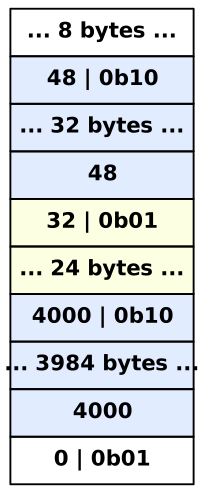
Each rectangle represents either an 8-byte header or footer value or the indicated number of unused or (payload + padding) bytes (we don’t care about their values, nor about which bytes are payload vs. padding). From top to bottom these are:
- The heap header (8 unused bytes at the top of the heap).
- The header for a 48-byte free block. The
0b10represents the status bits which indicate that the previous block is allocated and this block is free. - 32 bytes of unused space in the 48-byte free block.
- The footer of the free block, containing the number 48 (the size of the block).
- The header for a 32-byte allocated block. The status bits indicate previous-is-free and this-is-allocated.
- The 24-byte payload + padding for that 32-byte allocated block.
- The header for a 4000-byte free block, including status bits.
- 3984 bytes unused in that free block.
- The footer of that free block with the number 4000 in it.
- The heap footer, which has the same format as a block header but which has a “size” of 0 which would be invalid for a real block.
Some notes:
- ‘|’ is the bitwise OR operator. We use it because the size and status bits are combined using bitwise OR and occupy the same space.
- The ‘0b’ prefix is for binary numbers just like ‘0x’ is used for hexadecimal.
- Shading has been used to indicate which blocks are free/allocated. This is not required but is helpful. The status bits carry the same information.
- Unused bytes and payload + padding bytes are indicated using ‘…’ and the number of bytes is listed. The memory allocation system doesn’t care bout the values of these bytes.
- The initial size of the heap is 4096 bytes. The heap can grow larger if this gets used up.
- The blocks illustrated here could NOT have been created by the starter code. For the part of the checkpoint that asks you to diagram what the starter code will do, make sure you actually read the starter code.