
Welcome!
Everything is fine.
Cookies
Today, we'll talk about cookies, which are a key technology for stateful web interactions, including sessions.
We'll start with this XKCD comic: Server Attention Span.
Goal
By the end of today, be able to set and read a cookie Flask.
Optionally, implement a blogging
sort of application.
Plan
- (5) Announcements
- (10) Cookie review
- We'll go over the cookie basics
- We'll review how to use cookies in Flask
- Next time, I will demo the DevTools, network and application tabs
- (10) I'll answer your quiz questions
- (10) Demo
- (25) Breakouts
- (15) Git setup
(Warning, the example blogging app simulates logins but are not real logins. We'll deal with those a bit later.)
Announcements
- There are videos of cookies, blog exercises, shopping carts
- Grading status: I'll grade Forms this weekend
Flask Auto-Reloading
In development mode, Flask monitors all the *.py files that are in
the project: app.py and all the .py files that you import. If
any of them change, the app notices and reloads. That's very cool.
However, when Flask starts, it loads all the template files into memory and doesn't monitor them for changes. So, if you modify and save a template file, you'll have to reload Flask by hand:
^c(control-c) the app and restart it. Very quick and easy. That's what I do.- modify some Python file and wait for it to auto-reload.
Errors in Templates
Flask loads all the files in templates/, so if one of them is
buggy, even if your app doesn't use it, you'll still get an
error. So rm the file or mv the file into another folder.
Also, you can't comment-out the buggy code. The following doesn't work:
<!-- trouble with url_for here:
{{ url_for('some_function') }}
-->
because that's an HTML comment, not a Jinja2 comment. It would be
ignored by the browser, but it gets processed by render_template()
which is what gives you the error.
So, delete the buggy code, or copy it to a non-template file.
Review of Cookies
What are the important points for today?
- Cookies are the primary way to create continuity over a series of
stateless transactions. E.g.
Remember me?
or the user's zip code. - Cookies can be set by the server.
- Cookies are sent back (returned) automatically by the browser.
- Cookies are not secure. Don't put anything in a cookie that you don't want the user to see or meddle with. For example, login name.
- Cookies are the fundamental building block of sessions, which we'll talk about next time. Your project should include sessions.
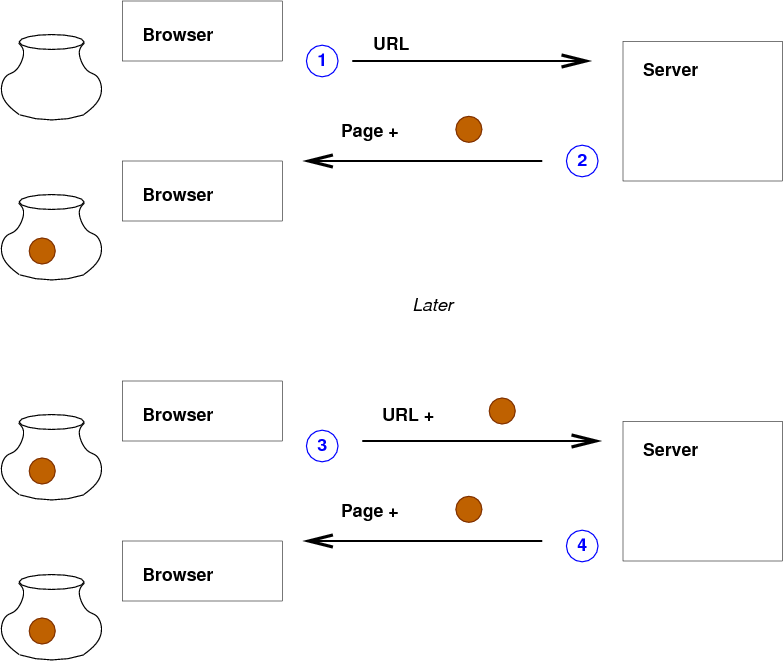
Sessions
Sessions might look like this:

Cookies in Flask
The basic idea:
## get zip code, default is Wellesley's zip
zip_code = request.cookies.get('zip','02481')
listings = movies_for(zip_code)
resp = make_response(render_template('movie-listing.html',
                                     location=zip_code,
                                     movies=listings))
resp.set_cookie('zip',zip_code)
return resp
Notice that this is backwards from normal variables! With normal variables, we set them and later we use them. Here, it seems like we use them and then set them. But
- we can't assume they are set, so we have appropriate defaults
- we are using the value that may have been set earlier, in a prior request
- so we have to think about sequences of interactions
- we are setting the value that can be used on the next interaction (a later request)
Cookies Demo
source ~/cs304/venv/bin/activate
cd ~/cs304/
cp -r ~cs304flask/pub/downloads/cookies/ cookies/
cd cookies
I'll run the app (you're welcome to as well) and I'll demo the basics
- I'll even access it from two different browsers, using two different names
Questions
I'll answer your questions
Seeing Cookies using Firefox DevTools
To see cookies in Firefox:
- Open the Inspector
- Look in Storage
- Look in Cookies
Practical Info
In the past, we could always start fresh
by restarting our app and
reopening it in the browser.
But with cookies, that won't work: there may be cookies left over in the browser.
So, do one of these:
- clear the cookies in the browser when re-starting.
- run the app in an incognito window and close the window when done.
Cookies Activities
If you want to understand cookies better, I think these are worth doing, but it's okay to skip them.
Not Secure
There's a video demo of how cookies are not secure.
First, copy the example/exercise:
cp -r ~cs304/pub/downloads/blog-ex-mysql/ blog/
cd blog/
cp start.py app.py
Then, the demo procedure is:
- start the
done.pyapp - login as one user, say
grumpy - Open the DevTools
- Modify the cookie value to be another user, such as
doc - Post again
We were able to post as Doc even though we don't know Doc's password!
Summary
- Complicated because you have to think about a series of transactions
- Have to consider the possibility that it won't exist (no prior visit or cookie expired)
- Usually for a small amount of stuff, or a key in to a database
- Cookies can be intercepted unless the whole connection is encrypted (HTTPS)
- Cookies can be tampered with by JavaScript, debugging tools, or compromised browsers.
- Cookies are not secure!
Git Setup
Breakouts
- Work on Lookup