
Welcome!
Everything is fine.
Requests, Threads and Flask
Plan
- Announcements
- Recap Requests
- Recap Threads
- Quiz Questions
- Breakout session activities (Ajax)
Announcements
- Project Draft is due this week, but definitely before the break
- Exam on Friday. Please do not miss class!
Requests
The client might not just be a browser. Most of the time it will
be, but it might not. The requests module allows us to use a Python
program to do so. For example, to write a web scraper.
You will not need to write such a module in this course. I'm teaching it because I hope:
- It will clarify what's going on with the Ajax assignment, by allow you to focus on the back end.
- It will broaden your understanding of web database applications.
- It will help you in internships, research projects, and the like.
The essentials are pretty easy:
The requests module allows us
- to make GET requests
- to find out the response status code
- to get the returned web page
- to get the data in JSON format
- to make POST requests
- to use sessions by saving a cookie and sending it in a later request
Examples:
resp = requests.get(url)
print(resp.status_code)
page = resp.text
data = resp.json()
resp = requests.post(url, data=payload_dictionary)
session = resp.cookies
resp = requests.get(url, cookies=session)
Demo from last week. Here's the server:
cd ~/cs304/likes/
source ~/cs304/venv/bin/activate
python app.py
And the requests client, which does not use the virtual environment, but does (2025) need to be updated.
cd ~/cs304/likes/
cp ~cs304flask/public_html/downloads/likes/reqs.py .
python reqs.py
I'll answer your requests questions
Threads
What are the important points for today?
- Threading is an important concept and strategy
- Flask code has to be thread-safe, also called re-entrant.
- Local variables and parameters are always thread-safe.
- Instance variables, class variables, and global variables may not be thread-safe (but they might be).
- Some uses of shared variables can be thread-safe; others require locks
- Nevertheless, threads and shared variables can be useful.
Thread Concepts
- Threads are (relatively) cheap to create.
- Threads share code and heap, but have their own stack.
- Inter-thread communication is easy via shared variables and data structures. This can be a big advantage.
- However, modifications of shared data structures might need to be atomic, requiring locks or other synchronization
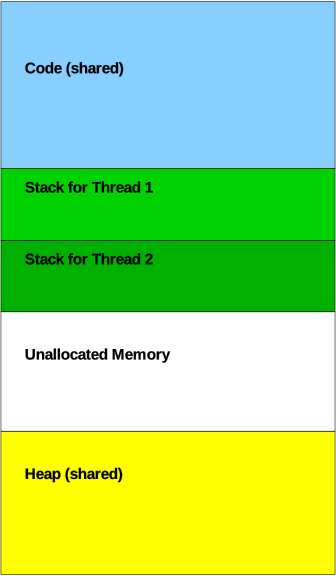
A multi-threaded Flask app:

So, our two threads are sharing the code and heap from our Flask app.
Race to 50
Here's the race to 50 and race to 50 fixed examples:
python raceto50.py
python raceto50fixed.py
diff raceto50.py raceto50fixed.py
Practical Project Implications
- Avoid global variables. Global constants are okay.
- If you need a global variable, make sure your code is thread-safe.
- Make sure every request uses a separate connection
- However, each request can share a single connection
- Bask in the knowledge that you're writing multi-threaded code. 😁
You probably won't need locking. But you should know about it just in case.
Questions
I'll answer your quiz questions.
Configuring Apache
FYI, here's how Apache can be configured. This is pretty standard.
# worker MPM
# StartServers: initial number of server processes to start
# MaxClients: maximum number of simultaneous client connections
# MinSpareThreads: minimum number of worker threads which are kept spare
# MaxSpareThreads: maximum number of worker threads which are kept spare
# ThreadsPerChild: constant number of worker threads in each server process
# MaxRequestsPerChild: maximum number of requests a server process serves
<IfModule worker.c>
StartServers         4
MaxClients         300
MinSpareThreads     25
MaxSpareThreads     75
ThreadsPerChild     25
MaxRequestsPerChild  0
</IfModule>
Imposter Survey
If you're willing, please spent 7-8 minutes filling out
Activity
- Work on what you need to work on
Summary
- Threads are cool and powerful, but you have to be careful.
- Don't put stuff in a shared variable that belongs just to one request
- lock or synchronize access to shared data.
- Each request should have its own database connection, to avoid getting wires crossed.