Quiz
- can we talk more about how to connect external files?
Sure. We just use the
Then put your JS code in thescripttag with thesrcattribute:mystuff.jsfile - I would like to know more about when to connect JS to HTML with a separate file vs not.
Great question! It's something I've gone back and forth on, even in this class.
- putting JS in the HTML file is simpler and easier: fewer files to copy around, edit, etc. BUT
- putting JS in a separate file allows VS Code to properly indent, syntax highlight, offer suggestions, etc.
Lately, I feel like the second approach is usually better, so I only use the first when there is only a very small amount of JS.
- I'd like to have more practice with anonymous functions.
We'll do that today!
- splice method for JS arrays—I'm confused about the description that says that splicing ""optionally removes/inserts some elements."
It's not well worded. Essentially splice can be use to (1) insert some elements, (2) delete some elements, or (3) both.
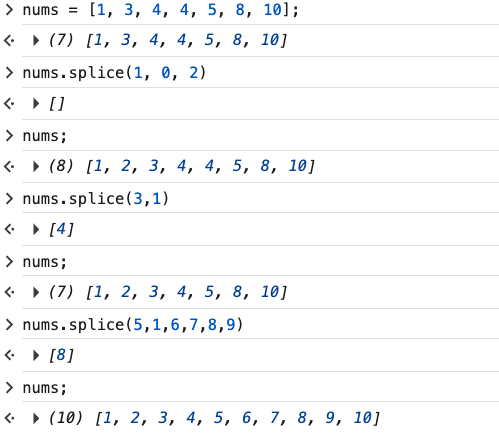
- what would the typeof operator be used for in context?
If you have a heterogenous array (different types of things in it), you can use typeof to determine whether something is a string, number, object, etc.
- What is the difference between an object in Java and JavaScript?
Great question! Objects play two roles in JS: dictionaries and the building blocks of objects in the sense of OOP and Java.
We won't be looking at OOP in this course; there just isn't room.
You can check out OOP in JS from CS 204.
- javaScript object literals
These are just like Python dictionaries, except for the dot notation, which is a convenient shortcut when the property is known.
In practice, we almost always know the property, so the shortcut becomes the normal thing, and
The square brackets become the unusual thing.