Reading: Texture Mapping
Mapping Textures onto Curved Surfaces
In Three.js, textures can be mapped onto curved objects (e.g. spheres, cones,
or cylinders) in the same way they're mapped onto flat surfaces, by setting the
map property for the material to a THREE.Texture
object. See my world globe and (somewhat marginal) pine tree:
Nearest and Linear Filters
When mapping texture onto a triangular face during the rendering process, Three.js:
- first determines which texture coordinates to use for each pixel touched by the triangular face
- then determines which texture color to use for each pixel, based on the texels (texture elements) around the computed texture coordinates
Pixels in the triangular face could be larger or smaller than the corresponding texels. In the picture below, the texture pattern on the left is very coarse and each texel is larger than the pixels in the image being rendered (shown in the center). For the texture pattern on the right, the texels are smaller than the pixels being rendered. (A couple pixel-sized elements are shown superimposed in green on the two texture patterns.)
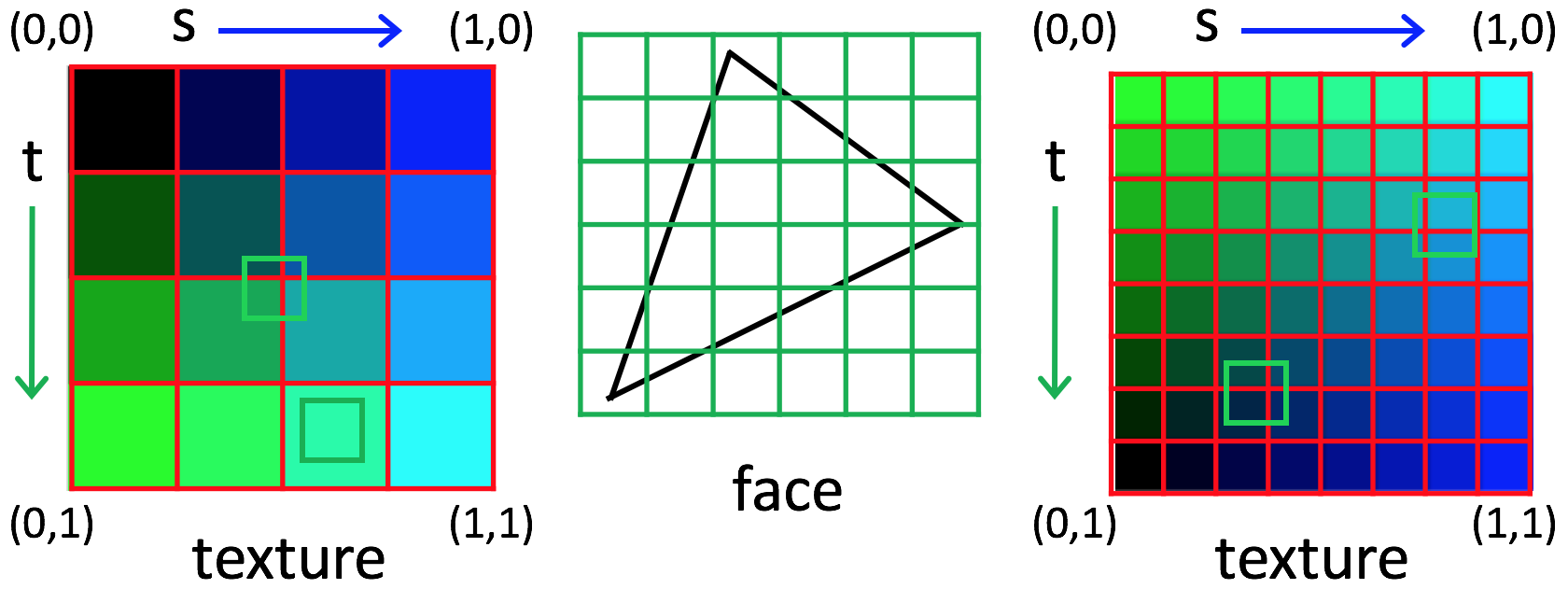
The minFilter property of a THREE.Texture object controls how the
texture color is determined for the scenario on the left, and the magFilter property
specifies what to do for the scenario on the right. Two common options for both are
THREE.NearestFilter (select the color of the nearest texel) and
THREE.LinearFilter (linearly interpolate between the colors
of the four nearest texels). The two options can appear quite different,
as shown in the following demo:
choice of nearest texture color or linear interpolation between neighboring colors
Summary
Here are the key ideas on texture mapping:
- At its most basic level, a texture is an array of pixels, similar to an image
- Each vertex of a triangular face can have texture coordinates - these coordinates
are 2D (e.g.
(s,t)or(u,v)) and lie within the [0,1] interval - Texture coordinates outside the [0,1] interval can specify a pattern of
repetition that can be
- clamped to the edge
- repeated
- mirrored
- The repetition method is specified by the
wrapSandwrapTproperties of theTHREE.Textureobject - Textures can also be repeated by setting the
repeatproperty for theTHREE.Textureobject - When loading an image to use for texture mapping, we need to consider that it takes a non-negligible amount of time for the image to load, so we need to write event handlers for the after load event that render the scene after all images are loaded
- When accessing images hosted on a different domain, our JavaScript code
bumps up against the Same-Origin Policy. When loading images
from a local machine, we can start up a web server using Python's
SimpleHTTPServermodule - Textures interact with lighting and other material properties (e.g. Phong material) of the surfaces
- When accessing the texture array using texture coordinates, we can either take the value of the nearest texel, or we can linearly interpolate over the four neighbors
- Finally, we can map textures onto flat or curved surfaces
In class, we'll see how we can create synthetic texture patterns and briefly touch on some advanced methods for texture mapping that use "bump maps", "normal maps", and "environment maps".