|
CS 332
Assignment 3 Due: Friday, October 7 |
|
This assignment contains one extended problem in which you will implement a stategy to track the moving cars in a video of an aerial view of a traffic scene, and visualize the results. You are encouraged to work with a partner on this problem!
Problem: Tracking Moving Objects
The /home/cs332/download/tracking folder contains a video file named
sequence.mpg that was obtained from a static camera mounted on a building
high above an intersection. The first image frame of the video is shown below:
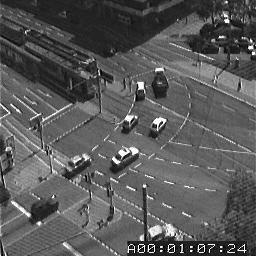
The code file named getVideoImages.m contains a script that reads the video file into
MATLAB, shows the movie in a figure window, extracts three images from the file (frames 1, 5, and 9 of
the video), displays the first image using imtool, and shows a simple movie of the
three extracted images, cycling back and forth five times through the images. We will go over the
getVideoImages.m code file in class, which uses the concept of a structure in
MATLAB, and the built-in functions VideoReader, struct, read,
and movie.
Most of the visual scene is stationary, but there are a few moving cars and pedestrians, and a changing
clock in the bottom right corner. Your task is to detect the moving cars and determine their movement
over the three image frames stored in the variables im1, im2, and im3. (Note
that the clock has been removed from these three images.) To solve this problem, you will use a strategy
that takes advantage of the fact that most of the scene is stationary, so changes in the images over
time occur mainly in the vicinity of moving objects. The image regions that are likely to contain the moving
cars are fairly large regions that are changing over time.
Create a new script named trackCars.m in the tracking folder, to place your
code to analyze and display the movement
of the cars across the three images provided. (You are welcome to define separate functions for subtasks,
but this is not necessary.) Implement a solution strategy that incorporates the following steps:
- for each pair of consecutive images (i.e. the pair
im1andim2, and the pairim2andim3), find image locations where many pixels within a neighborhood around the location have a large change in brightness between the two images. Some trial-and-error exploration will be needed to determine a reasonable neighborhood size, an appropriate threshold on the brightness change, and a good value for the fraction of changing pixels in the neighborhood that is used to decide that the region may contain a moving car - find large connected regions of locations where brightness is changing between the two images
— these regions are likely to correspond to individual cars or parts of cars (the built-in function
bwlabelcan be helpful here) - determine the approximate center of each large connected region, corresponding to the rough location of
each car (the built-in function
regionpropscan be helpful here) - given the car locations identified using the image pair
im1andim2, and the car locations identified using the image pairim2andim3, match up the locations of the cars at these two moments in time, assuming that a car region at one moment moves to the closest car region at the next moment - display the results of your analysis. In the solutions that I demonstrated in class,
subplotwas used to create one figure window with three display areas showing the first imageim1and the large connected regions obtained from analyzing the two image pairs, with superimposed red dots shown at the center of each region. A second figure window displayedim1with superimposed red lines showing the movement of each car over time.
Hints: The file codeTips.m in the tracking folder provides simple
examples of some helpful coding strategies,
including examples that use the built-in bwlabel and regionprops functions,
access information stored in a vector of structures, and superimpose graphics (using the built-in
plot and scatter functions), on an image that is displayed in a figure window.
Be sure to comment your code so that your solution strategy is clear!
Submission details: Hand in a hardcopy of any code files that you wrote or modified.
Drop off an electronic copy of your code files by logging into the CS file server, connecting to your
tracking folder, and executing the following command:
submit cs332 tracking *.*