Passwords, Logins and Bcrypt
To have secure logins, we need a way to store users's passwords.
Because hackers have been known to penetrate into secure
servers, we need extra layers of defense. In particular, we will not
store the plaintext password, but rather a one-way hash of the
password.
In this course, we will use a hashing algorithm known as bcrypt.
- Hashing and Cryptographic Hash Functions
- The Logic of Hashing
- Hashed Passwords
- Account Creation
- Login
- Hackers
- Salt
- Reading
- Practical Implementation
- Installing Bcrypt
- Hashing with Bcrypt
- The Dual Nature of hashSync
- Shortcut Functions
- Rounds
- Asynchronous Usage
- Login App
- Main Handler
- Main Page
- Join
- Login
- Logout
- Logins and Sessions
- Login Middleware
- Conclusion
- Summary
Hashing and Cryptographic Hash Functions
I've borrowed the following image from the Wikipedia page on cryptographic hash functions. That's a good page to read to learn more. You should also consider reading the Wikipedia page on hash functions which are used for practical tasks like implementing Python's dictionary data structure.
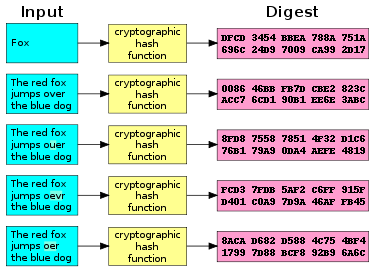
Hash functions are useful in many ways. We will use them for password checking, but first, some setup and terminology:
- The input to a hash function is an arbitrary-length string. It's sometimes called a message. For us, these will be the user passwords.
- The output of a hash function, sometimes called a hash or a digest, is a fixed-length number, usually written as a fixed-length string of hexadecimal digits. Some examples:
Just to be concrete, here's how to use the unix
md5sum command to compute
the MD5 digest of a string (the echo command) and even the contents
of an entire file (the cat command):
echo "dilligrout" | md5sum
beeb0193f753dfdbd4e7f429ece1460a  -
cat passwords.html | md5sum
1629a89ff94308185a32900b7370b677  -
The Logic of Hashing
Now, let's turn to the logic of using hashing functions for password checking.
- The hash (the value or digest) depends on every character of the input
- The hash depends deterministically on the input and only the input.
- There are a very large number of possible hash values,
- so the chance of two different inputs hashing to the same output value is vanishingly small
Therefore, if the hash values are the same, the inputs must have been the same.
Take a minute to think about that:
- If I have two objects, A and B, and
- hash(A) == hash(B), then
- we conclude that A == B
The hash(A) is like a fingerprint. It's unique to A. If two things have the same fingerprint, they are almost certainly the same thing.
If you're a detective, and you find A's fingerprints at the scene of the crime, then you can feel extremely confident that A was there. We assume that the chance that two different people have the same fingerprint is vanishingly small.
Note that this last step is an important one: the chance of two different inputs hashing to the same output value is vanishingly small. The experts who devise these hash functions work hard to ensure that's the case. Under reasonable assumptions (which we won't get into) the chances that A and B are different given that hash(A)==hash(B), is something like 2-b where b is the number of bits in the hash.
So, for bcrypt, the chances are 2-184 which is roughly 4.078 x 10-56, which is essentially zero.
Hashed Passwords
Let's talk about how to use hashing to implement password checking and avoid storing the plaintext passwords. How does that work? There are two phases to the process: (1) creating an account and (2) verifying a password when someone logs in.
Imagine that Neville Longbottom is creating an account and he wants to
use dilligrout as his password.
Account Creation
Neville fills out the form, the server receives the username
(nlongbottom) and password (dilligrout). It computes a hash of
the password, and stores the username and hash:
| username | hash(password) |
|---|---|
| nlongbottom | 591747ca7ce5608a92d17236d3b1d0d7a80968f764bc13288e4471d0bd30060b |
The system then discards the plaintext password, not storing it anywhere.
Login
Later, when Neville logs in, he provides the same username and
password (he carefully wrote the password down so he wouldn't forget
it!), the system again computes the hash of dilligrout and gets
591..60b. That matches the stored hash, and Neville is logged in.
This works because the logic is that if the hashes match, then the inputs were the same, so Neville entered the correct password for the account.
Hackers
If Malfoy hacks into the server and gets Neville's hashed password, he can't reverse the computation to get "dilligrout", because the hashing algorithm is a one-way function. (This is a common characteristic of cryptographic hash functions — you can't run them backwards to compute the input from the output. It would be like un-scrambling an egg and putting it back in its shell.) This means he can't use the hashed password to find the actual password and login.
Malfoy's only hope is to run the one-way hash forward on many, many
possible passwords, hoping that one of them will hash to the
591...60b value. If he hits on "dilligrout", it will, of course,
match, and he'll know Neville's password.
This is a brute force approach to cracking passwords, facilitated by high-performance computing using graphics cards.
Salt
The scheme above has two slight weaknesses. First, a user can choose a weak password, one the attacker can easily guess or find by brute force. Secondly, two or more users might choose the same password, and the attacker needs to only guess one to get them all. The notion of adding salt to the password addresses these weaknesses.
First, let's understand the weaknesses. Suppose Goyle chooses '123' as his password, because he has trouble remembering a better password. If the attacker tries all strings less than 5 characters in length (there are only about 62 million strings of lowercase letters and digits of length 5 or less) the attacker will certainly succeed. Even better, the attacker can pre-compute the hash values of common passwords like '123' and just compare to the stored hashes.
Furthermore, suppose Crabbe also uses the '123' password. His hashed password is exactly the same as Goyle's, so when the attacker hashes '123' and searches the password database, there are two matches, so both accounts are compromised.
To improve this, we create a random string, called salt
, at the
time that each person creates their account, and we store that salt
along with the encrypted password. The password algorithm combines the
salt and the password (essentially creating a longer and more random
password), hashes the longer string, and proceeds as usual.
| username | salt | hash(password+salt) |
|---|---|---|
| nlongbottom | xocivu | cdde1bed702518ef735ac8530915dff3689a4594687c9993254eb785ad6d91d6 |
| crabbe | Z98xbs | 174c4a5799b09c0adae18bfe566c23684e68345fc4feca8b0b98bd1a1b5ce1c5 |
| goyle | v5bnws | 0478d2c697c0dcdc276e44514069f44a369defee06bcf4a2a19c9e3020cc2e43 |
Thanks to the salt, now the hacker
- can't pre-compute the hashes, since they involve a custom salt, and
- can't match multiple users because even if they have the same password, they will have unique salt strings and therefore unique hashed values
Thus, salt is an important ingredient in password security. Most password schemes use salt — even the original Unix password encryption from the 1970s used salt (although not very much). Bcrypt does too.
Reading
Please read/skim the following references, particularly if you'd like to understand the ideas behind using Bcrypt.
- Dustin Boswell: How to handle Passwords. I like this presentation a lot. Unfortunately, that site has been taken down, but I found a copy archived by the Internet Archive (the WayBack machine) in April 2019: Dustin Boswell on How to Handle Passwords It gives a kind of play-by-play history of attacks and defenses, which I liked.
- Coda Hale: How to Safely Store a Password. You know where this person stands!
- nodejs bcrypt module. This shows how to use bcrypt in Node.js. We'll cover this below.
Practical Implementation
From here on, we leave theory and concepts behind and focus on creating a secure Express login procedure, which we'll also do in class.
The following is a bit of an outline of the following sections:
- Installing Bcrypt
- Hashing with Bcrypt
- Inserting new users
- Dealing with Concurrency
Installing Bcrypt
I've already installed bcrypt in our
~cs304node/omnibus/node_modules, so you already have access.
Hashing with Bcrypt
Here's the simplest way to use bcrypt. It's not yet ready for logins, but we can start understanding the ideas.
You can run this code using Node.js, using the demo1.js file in ~cs304node/apps/passwords/
bcrypt = require('bcrypt');

// on signup
passwd1 = 'dilligrout'
salt1 = bcrypt.genSaltSync()
console.log("new salt ", "\t", salt1);

hash1 = bcrypt.hashSync(passwd1, salt1)
console.log('signup/stored', "\t", hash1);

// successful login
passwd2 = 'dilligrout'
hash2 = bcrypt.hashSync(passwd2, hash1)
console.log('good login', "\t", hash2, hash1 == hash2);

// failed login (or attack?)
passwd3 = 'horse battery'
hash3 = bcrypt.hashSync(passwd3, hash1)
console.log('failed login', "\t", hash3, hash1 == hash3);
Here's some output from one run. (Each run is different because of the random salt created on signup.)
[cs304node@tempest passwords] node demo1.js
new salt         $2b$10$5chp2H38LP1fcT2rJLMQ0u
signup/stored    $2b$10$5chp2H38LP1fcT2rJLMQ0uvKw4xlEINh/Qx8Bz8GAu1AvMHu8OwrS
good login       $2b$10$5chp2H38LP1fcT2rJLMQ0uvKw4xlEINh/Qx8Bz8GAu1AvMHu8OwrS true
failed login     $2b$10$5chp2H38LP1fcT2rJLMQ0uw5bHPdQxMAlK8xuSCX0m2breue91GbC false
On signup, we compute some salt, hash the password using the salt
to yield hash1 and store the result.
On login, hash the offered password with the stored hash and compare the return value with the stored hash.
- if they match, the offered password was correct and the login is successful
- if they don't match, the offered password was not correct and the login fails.
The Dual Nature of hashSync
The hashSync function above is used in two different ways, and
that's often confusing. The first argument is always the plaintext
password. The second is either:
- brand new salt for a new password or
- the stored value from an existing password
So, in the second case, where is the salt? It's in the hashed value
of the existing password. It's just the first 29 characters of the
60-character hashed value. The hashSync function just pulls out the
salt and ignores the rest of the hashed string.
Look at the output of the example run. You can see that the first 29 characters are always the same; they are the salt (plus other information).
While this dual-use feature is confusing at first, it's useful because it means we only have to worry about storing the hashed password, since it includes the salt.
Shortcut Functions
The demo1.js example works fine and is already pretty short, but the
bcrypt module gives us some shortcut functions which might be
helpful.
- the
hashSyncfunction can automatically generate the salt for us, if we tell it the number of rounds, which we'll discuss in a moment. - the
compareCryptfunction can compute the hash and compare it with the argument, returning true or false depending on whether they match, which is the only thing we care about.
Here's the code for demo2.js
// This version differs in using some shortcut functions

bcrypt = require('bcrypt');
const ROUNDS = 15;

// on signup
passwd1 = 'dilligrout'

hash1 = bcrypt.hashSync(passwd1, ROUNDS)
console.log('signup/stored', "\t", hash1);

// successful login
passwd2 = 'dilligrout'
result2 = bcrypt.compareSync(passwd2, hash1)
console.log('good login', "\t", result2)

// failed login (or attack?)
passwd3 = 'horse battery'
result3 = bcrypt.compareSync(passwd3, hash1)
console.log('failed login', "\t", result3)
Here's the output from a sample run:
signup/stored    $2b$15$iH7ALgbvSVqVDFC1I8/Uy.LZYeS4kOBvBr5Sih/znPrYn2hUI55gm
good login       true
failed login     false
Rounds
If you run demo2.js for yourself (you really should), you'll see
that it's slow. It's a lot slower than demo1.js, in fact. That's
because demo1.js used the default number of rounds, which is 10.
You can see the 10 in the salt string:
$2b$10$5chp2H38LP1fcT2rJLMQ0u
while the demo2.js version used 15 rounds, which you can also see in the hashed string:
$2b$15$iH7ALgbvSVqVDFC1I8/Uy.LZYeS4kOBvBr5Sih/znPrYn2hUI55gm
The number of rounds is the measure of the work or slowness of the algorithm. We want a slow algorithm, so that if our encrypted passwords are stolen, the hacker will have to use a lot of computing power to crack the passwords using brute force. The rounds argument is an important feature of the bcrypt algorithm.
Asynchronous Usage
One downside to the slowness of bcrypt is that our Event Loop Architecture only runs one thing at a time in the main loop, so if it's stuck hashing a password, nothing else can happen.
So, bcrypt provides an asynchronous API as well. demo3.js1
demonstrates that interface:
// This version differs in using asynchronous functions. Look for *await*

bcrypt = require('bcrypt');
// As of May 1, 2024,
// 19 rounds requires about 28 seconds
// 18 rounds requires about 14 seconds
// 17 rounds requires about 7 seconds
const ROUNDS = 17;

function now() {
    let d = new Date();
    return d.toLocaleTimeString();
}

async function demo3() {

    // on signup
    passwd1 = 'dilligrout'

    console.log(now(), "\t start signup");
    let hash1 = await bcrypt.hash(passwd1, ROUNDS);
    console.log(hash1, "\t signup/stored");

    console.log(now(), "\t start login");
    // successful login
    passwd2 = 'dilligrout'
    result2 = await bcrypt.compare(passwd2, hash1)
    console.log(result2, "\t successful login");

    console.log(now(), "\t start login");
    // failed login (or attack?)
    passwd3 = 'horse battery'
    result3 = await bcrypt.compare(passwd3, hash1)
    console.log(result3, "\t failed login");

    console.log(now(), "\t done");

}

demo3();
Notice the use of await for the bcrypt functions and also notice
that it drops the Sync suffix to the function names. This is clearly
the intended and better API.
This might remind you of the synchronous and asynchronous file I/O functions back when we learned about promises
Login App
In the ~cs304node/apps/passwords/ directory is a complete, working
example of an app that allows people to join, login, and logout,
securely storing the password in encrypted form. The whole file is
only 115 lines of code, including the prelude and postlude, so the
interesting part of the code is only about 80 lines of JavaScript.
The app uses the users collection in the bcrypt database to store the
usernames and encrypted passwords. Each document has just those two
keys (in addition to the _id field).
MongoDB Enterprise atlas-kumn99-shard-0:PRIMARY> db.users.find().pretty();
{
    "_id" : ObjectId("6408cadb0a106ee407402ee6"),
    "username" : "og102",
    "hash" : "$2b$10$1V/v0qsfBZuh/xiga3UD9Odp7zDJb8..0IpT0ju9SdXcYT0HiI8yC"
}
{
    "_id" : ObjectId("64162e1e7b27a924fa163597"),
    "username" : "scott",
    "hash" : "$2b$15$yQVuyofBe0Zi6XsVNq1mKOI9B4eVLiEVH9eAHuYEi9onnJEltyRkO"
}
The next few sections will look at all the major routes, in turn.
Main Handler
The main page has a trivial handler; it just renders the EJS template
app.get("/", (req, res) => {
  return res.render("index.ejs", {})
});
Main Page
The index.ejs file for the main page just has two forms on it:
  <h2>Register:</h2>
  <p>
    <form action="/join" method="POST">
        <label> Username
            <input type="text" name="username" placeholder="og102">
        </label>
        <label> Password
            <input type="text" name="password" placeholder="********">
        </label>
      <button type="submit">register</button>
    </form>
  </p>
  <h2>Login:</h2>
  <p>
    <form action="/login" method="POST">
        <label> Username
            <input type="text" name="username" placeholder="og102">
        </label>
        <label> Password
            <input type="text" name="password" placeholder="********">
        </label>
      <button type="submit">login</button>
    </form>
  </p>
The result looks like this:
Register:
Login:
To join or register means to supply a password for the first time.
Notice the endpoints those forms go to (namely /join and /login)
and the fact that they both use POST.
Join
Here's the handler for joining. The code does the following steps
- pulls the username and password out of the request
- checks to see that this username is not already in use
- hashes the supplied password
- stores the hash in the database
- redirects to the page for logged-in users, namely
/hello
You should be able to understand all of the code below. Take a few minutes to read it.
app.post("/join", async (req, res) => {
  try {
    const username = req.body.username;
    const password = req.body.password;
    const db = await Connection.open(mongoUri, DBNAME);
    var existingUser = await db.collection(USERS).findOne({username: username});
    if (existingUser) {
      req.flash('error', "Login already exists - please try logging in instead.");
      return res.redirect('/')
    }
    const hash = await bcrypt.hash(password, ROUNDS);
    await db.collection(USERS).insertOne({
        username: username,
        hash: hash
    });
    console.log('successfully joined', username, password, hash);
    req.flash('info', 'successfully joined and logged in as ' + username);
    req.session.username = username;
    req.session.logged_in = true;
    return res.redirect('/hello');
  } catch (error) {
    req.flash('error', `Form submission error: ${error}`);
    return res.redirect('/')
  }
});
Login
Login is about the same difficulty as joining. The steps are straightforward:
- pulls the username and password out of the request
- looks up this user
- if the user doesn't exist, complain and give up
- checks the password against the stored hash
- if the password doesn't match, give an error
- redirects to the page for logged-in users, namely
/hello
Again, take a few minutes to read the code; it's good practice to do so.
app.post("/login", async (req, res) => {
  try {
    const username = req.body.username;
    const password = req.body.password;
    const db = await Connection.open(mongoUri, DBNAME);
    var existingUser = await db.collection(USERS).findOne({username: username});
    console.log('user', existingUser);
    if (!existingUser) {
      req.flash('error', "Username does not exist - try again.");
     return res.redirect('/')
    }
    const match = await bcrypt.compare(password, existingUser.hash);
    console.log('match', match);
    if (!match) {
        req.flash('error', "Username or password incorrect - try again.");
        return res.redirect('/')
    }
    req.flash('info', 'successfully logged in as ' + username);
    req.session.username = username;
    req.session.logged_in = true;
    console.log('login as', username);
    return res.redirect('/hello');
  } catch (error) {
    req.flash('error', `Form submission error: ${error}`);
    return res.redirect('/')
  }
});
Logout
The logout route is the easiest of all. If the user is logged in
(username in the session), then it nullifies all the session
values. Otherwise, it complains that the user can't logout because
they aren't logged in. (I suppose the app could just silently ignore a
pointless logout, rather than showing an error.)
app.post('/logout', (req,res) => {
  if (req.session.username) {
    req.session.username = null;
    req.session.logged_in = false;
    req.flash('info', 'You are logged out');
    return res.redirect('/');
  } else {
    req.flash('error', 'You are not logged in - please do so.');
    return res.redirect('/');
  }
});
Logins and Sessions
The purpose of logins is not just to authenticate users, but also to
remember them over a series of interactions, for which we used the
terminology session, and which Express supports
with the req.session dictionary.
Recall that the session is implemented as a special cookie value that is passed back and forth from brower to server. (It's special because the cookie value is digitally signed so that it can't be tampered with by the user.)
In the example app (the ~cs304node/passwords/
directory), there are several endpoints that are just for logged-in
users. Let's look at one:
app.get('/hello', (req,res) => {
  if (!req.session.username) {
    req.flash('error', 'You are not logged in - please do so.');
    return res.redirect("/");
  }
  return res.render('hello.ejs', {username: req.session.username});
});
The rendering of the hello.ejs file incorporates the username, which
is gotten from the session dictionary. The username was put into the
session dictionary by the /login endpoint, once the username and
password were checked and found to be valid. Note that the /login
endpoint function doesn't communicate directly with the /hello
endpoint function. Instead, it communicates indirectly via the
browser.
- the
/loginendpoint putsloggedIn:trueandusername: 'Wendy'into thesessiondictionary, which is sent back to the browser via a cookie. - The browser sends a GET request to the
/helloendpoint, which includes the session cookie. - The
/helloendpoint receives the request, pulls the values ofloggedInandusernameout of the session dictionary and uses those values in rendering thehello.ejsfile. - The browser receives the rendered page.
Here's a figure that depicts that session interaction:

loggedIn and username are put in the session dictionary that is
sent back and forth between browser and server via a cookie.
Login Middleware
The /hello endpoint requires that someone be logged in, so that a
username is available to render the page. In other endpoints, the
username might be necessary for authorizing an action, identifying
who created an entity (such as a movie, a restaurant review, a post,
or whatever). Therefore the code checks that someone is logged in,
via code like this:
  if (!req.session.loggedIn) {
    req.flash('error', 'You are not logged in - please do so.');
    return res.redirect("/");
  }
This isn't a big chunk of code, and so it's not unreasonable to copy/paste it to whatever endpoints also need to require that someone be logged in. But there's a better way. We can create a middleware function out of this code, such as the following:
function requiresLogin(req, res, next) {
  if (!req.session.loggedIn) {
    req.flash('error', 'This page requires you to be logged in - please do so.');
    return res.redirect("/");
  } else {
      next();
  }
}
The interesting thing here the call to next(), which is an argument,
along with the request (req) and response (res) objects that we
are familiar with. The Express infrastructure will call
requiresLogin with these three values, where the next argument is
the next function in the chain. In many cases, the next function
will be the endpoint function itself.
Here's how we might use this middleware function:
app.get('/about', requiresLogin, (req,res) => {
  return res.render('about.ejs', {username: req.session.username});
});
So, if a GET request to /about comes into the server, it first goes
through requiresLogin.
- If no one is logged in,
requiresLoginsends back a redirect and our endpoint handler never gets the request. - if someone is logged in,
requiresLogininvokednext, which means that the request gets to our endpoint handler.
Here's a diagram depicting this:

The requireLogin function runs before our endpoint.
This fantastic feature of Express means that we can insert this
requiresLogin middleware to any endpoint that we want, and if we
decide we want to change the computation or behavior (for example,
redirecting people to a login page instead of the home page), we can
make that change in just this one function.
Furthermore, this is a general design feature of Express. Express allows us to set up as many middleware functions as we want. The following figure depicts that:

Middleware in general is a chain of functions. Here we have 3 middleware functions and 1 endpoint function.
Conclusion
This has been a long, complex journey, but the result is that we've learned
- how to join an app
- how to store passwords in encrypted form
- how to check passwords on login
- how to log users in and out of our app
Summary
Bcrypt
- Passwords should never be stored in plaintext in your database; they
should be one-way hashed with a cryptographically secure hash
algorithm, such as
bcrypt - Passwords can still be cracked by brute force.
- To thwart a brute-force approach, we can use an extremely slow
hashing algorithm, such as
bcrypt - The
bcryptalgorithm also uses salt, which is an additional random string that means that two accounts that use the same password will have different hash values. bcryptstores all the info it needs in the hash value, so you only neeed to store that one value.
LOGINS
- Your app can log someone in by putting their userid in the
session - Your app can log someone out by removing their userid from the
session