Texture Mapping 3
Today, we'll learn about MinFilter and MagFilter and discuss mapping onto non-rectangles.
Plan
- Announcements
- Texture Mapping recap
- Mid-semester Eval
- Piece of Cake exercise
Announcements
- Grading Status
- I made an adjustment in the schedule: curves and surfaces before animation. I think that will be better for your creative scene
- Who will be here on Friday?
Textured Barn Assignment
Creative Scene Assignment
Documentation will be extra important there.
Texture Mapping
Overview
- Magnification
- Minification
- non-rectangles
I'm talking about magnification and minification first because they sometimes come up with non-rectangles (though they can come up with rectangles, too).
MagFilter
The Magnfication Filter tells WebGL how to interpolate pixels when a texture has been magnified — that is, when it appears larger on screen than its actual pixel resolution.
Consider the tiny 2x2 color texture or even the 8x8 checkerboard texture mapped onto a much larger plane.
There are two choices:
NearestFilterwhich uses the texel that is nearest. In our example above, the texel that the upper left of the pixel is in is used for the entire pixel. Often ends up looking blocky, but the transitions are sharp.LinearFilterwhich uses all four corners and does a linear interpolation of the values. Doesn't look as blocky and can look fine if it's not too fuzzy.
The following figure illustrates these options.
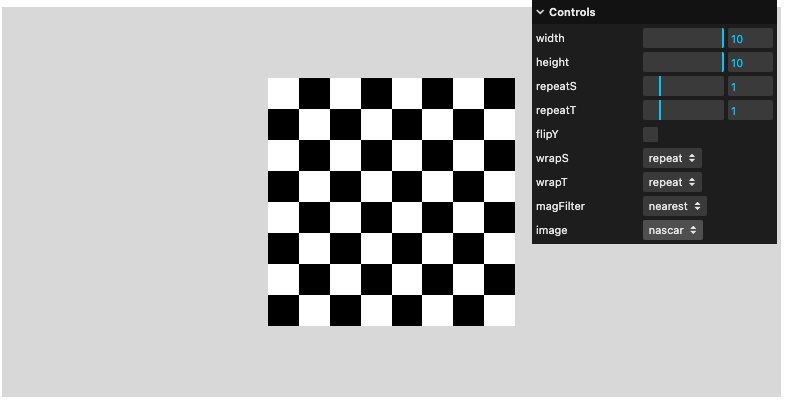
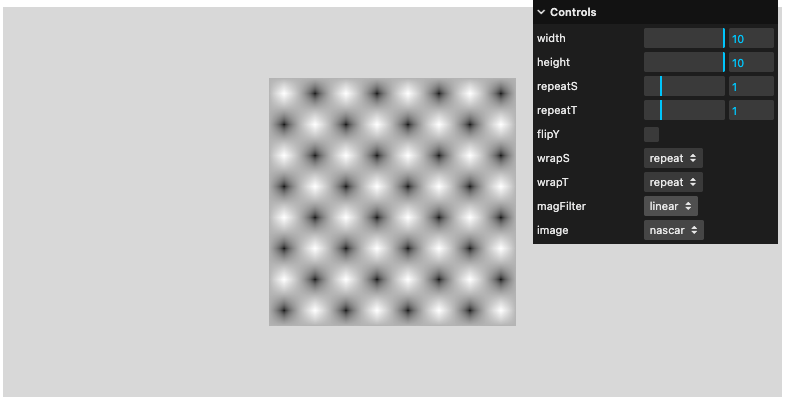
The example above is misleading, because it suggests that linear is worse. In practice, the texture is usually pretty large and has lots of detail, and we will want to use linear interpolation.
The Threejs default is to use linear interpolation.
MinFilter
This happens when the texture is larger than the pixel. There are a lot of choices here: Texture Constants
Many of those choices involve mipmaps. These are lower-resolution versions of the texture, so that the texture resolution more closely matches the pixel resolution. They are built when the texture is loaded, so they are ready to go during rendering.
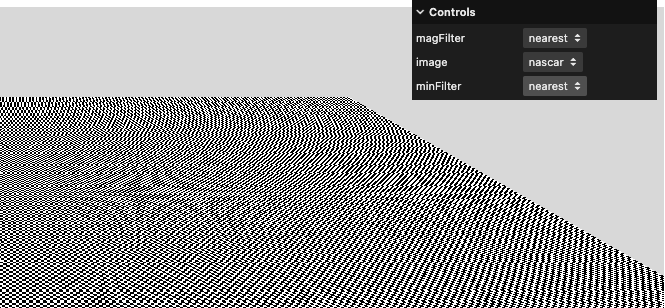
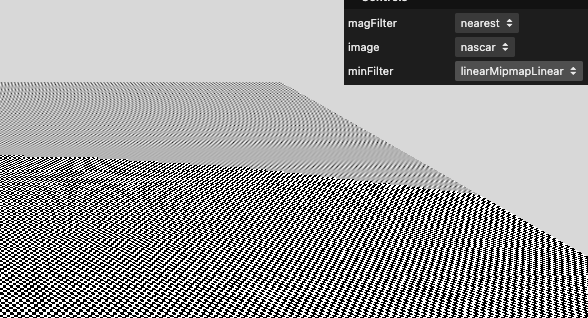
Here's a demo that is helpful. Look at the pixels in the far part of the plane and toggle the minfilter:
texture-mapping/tutor-w-minfilter/
Here are two screenshots of that tutor:
Mag/Min Demos
- threejs mipmaps example w/ Caravaggio
- sbcode.net mipmaps
- texture-mapping/tutor
- texture-mapping/tutor-w-minfilter/
Non-Rectangular Surfaces
Let's start with some from the reading:
- circle
- texture-mapping/circle
- This works nicely because of the texture coordinates.
- sphere
- texture-mapping/globe
- only looks good because of the well-chosen texture
- the general problem is quite hard
- Cones and Cylinders:
Quiz Questions
Mid-Semester Eval
Please take some time to fill out this form: mid-semester eval
Note that there's a second section on AI.
Remember you can always talk to me or use the anonymous feedback form if something comes up.
Triangular Surfaces
The following builds a custom geometry, which is our topic for next time!
So does this:
- some of the sides of the tetrahedron look okay, others look terrible
- texture-mapping on non-rectangles is a pain
Piece of Cake Exercise
Let's texture map some designs on some cylinders to create a layer cake:
Let's start with this:
cd ~/public_html/cs307/
cp -r /home/cs307/public_html/lectures/11-texture3/cake-start cake
opendir cake
cd cake
What you'll have to do:
- figure out the mirror/repeat/clamping for the textures
- figure out the repetitions in s and t
- figure out the colors
- build two other meshes
- I suggest holding them all in a group:
new THREE.Group() - comment out the three planes
For extra credit, how could you make the top of each layer plain white?
We could supply an array of materials. The 1st value is the side material, 2nd and 3rd values are the top and bottom materials.
Data Textures
If you know how to build your texture out of raw pixels, you can do that programmatically. We'll spend just a little time on that code:
function makeTexture (design, color, wrapS, wrapT, repS, repT, flipY) {
    // create an array of colors to use for the texture
    var data = new Uint8Array(4*16*16);
    var i, j, n=0;
    console.log(color.r,color.g,color.b);
    var red = 255*color.r;      // red, green, blue on a 0-255 scale
    var green = 255*color.g;
    var blue = 255*color.b;
    var alpha = 255;
    if (design == 1) {                // arc texture pattern
       for (i = 0; i < 16; ++i) {
           for (j = 0; j < 16; ++j) {
               let dist = Math.sqrt(i*i + j*j);
               if ((dist >= 11) && (dist < 14)) {
                   data[n++] = red;
                   data[n++] = green;
                   data[n++] = blue;
               } else {
                   data[n++] = 255;
                   data[n++] = 255;
                   data[n++] = 255;
               }
               data[n++] = alpha;
           }
       }
    } else if (design == 2) {        // dot texture pattern
       for (i = 0; i < 16; ++i) {
           for (j = 0; j < 16; ++j) {
               let dist = Math.sqrt((i-7.5)*(i-7.5) + (j-7.5)*(j-7.5));
               if (dist <= 5) {
                   data[n++] = red;
                   data[n++] = green;
                   data[n++] = blue;
               } else {
                   data[n++] = 255;
                   data[n++] = 255;
                   data[n++] = 255;
               }
               data[n++] = alpha;
           }
       }
    } else {                         // triangle texture pattern
       for (i = 0; i < 16; ++i) {
          for (j = 0; j < 16; ++j) {
             if ((Math.abs(j-7.5) < (i/2)) && (i < 15)) {
                data[n++] = red;
                data[n++] = green;
                data[n++] = blue;
             } else {
                data[n++] = 255;
                data[n++] = 255;
                data[n++] = 255;
             }
              data[n++] = alpha;
          }
       }
    }

    // create a new texture object from the data array
    var textureObj = new THREE.DataTexture(data, 16, 16);
Summary
- Texture mapping onto cylinders is fine.
- Texture mapping onto cones and triangles is problematic. Often raises questions about minification and magnification.
- Texture mapping onto spheres is very hard
Next Time
Custom Geometry!