
Lab 2
Collections of numbers, vector operations and 2D plots
Part 1. MATLAB Tips of the day
Tip #1: colon notationThe colon notation is very helpful when generating vectors: start:step:end
(step is optional)
10:20 ==> [10 11 12 13 14 15 16 17 18 19 20]
10:5:20 ==> [10 15 20]
10:6:20 ==> [10 16]
0:0.2:1 ==> [0 0.2 0.4 0.6 0.8 1.0]
Note that 0:0.2:1 is equivalent to colon(0, 0.2, 1)
Tip #2: ellipsis
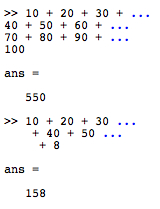
If you happen to find yourself typing in a looooong MATLAB expression,
you can use an ellipsis (...) to indicate line continuation. For example,
Problem: You cannot use ellipsis within a string, for example:
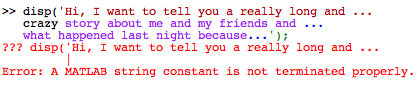
MATLAB often uses color to indicate how it understands your code.
See the red that turns into black and then purple above? That suggests a problem.Solution? Break your statement up into separate disp commands, like this
(note that the code below is part of an m-file, rather than code typed directly into the command window):

Tip #3: The input MATLAB command
Look it up in the online MATLAB documentation. Experiment with it in the command window.
- How can you get a number back?
- How about a string?
- What if the user hits Return without having entered anything at all?
- What happens if you add or omit the semicolon (;) at the end of the command?